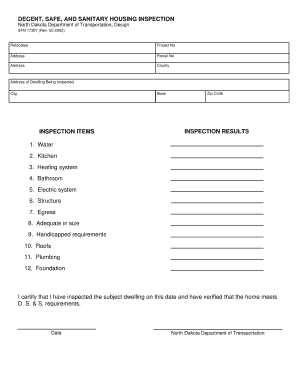
G Being Inspected City State INSPECTION ITEMS Zip Code INSPECTION RESULTS 1. Water 2. Kitchen 3. Heating system 4. Bathroom 5. Electric system 6. Structure 7. Egress 8. Adequate in size 9. Handicapped requirements 10. Roofs 11. Plumbing 12. Foundation I certify that I have inspected the subject dwelling on this date and have verified that the home meets D. S. & S. requirements. Date North Dakota Department of Transportation .
Open form follow the instructions
Easily sign the form with your finger
Send filled & signed form or save
How to fill out the ND SFN 17307 online
This guide provides clear and supportive instructions on how to complete the ND SFN 17307 form online. By following these steps, users can ensure that they accurately fill out the necessary information required for housing inspection.
Follow the steps to successfully complete the ND SFN 17307 form.
- Click ‘Get Form’ button to obtain the form and open it in your editor.
- In the form, begin by filling in the 'Relocatee' section with the relevant details about the person who is being relocated.
- Next, enter the 'Project No' associated with the inspection. This information helps identify the specific project under review.
- Fill out the 'Address' and 'County' fields with the complete address of the dwelling being inspected.
- Continue by providing the 'City', 'State', and 'Zip Code' of the property.
- In the 'Inspection Items' section, review and assess each item listed, including water, kitchen, heating system, and other listed components. Mark the appropriate results based on your inspection findings.
- Once all items are inspected, sign and date the certification statement provided at the bottom to verify the inspection was completed.
- Finally, review your entries for accuracy. You can save changes, download, print, or share the completed form.
Complete your ND SFN 17307 form online today to ensure your housing inspection is properly documented.
Experience a faster way to fill out and sign forms on the web. Access the most extensive library of templates available.
Related content
DECENT, SAFE, AND SANITARY HOUSING INSPECTION. North Dakota Department of Transportation...
... nd 25718913 3018 marketplace 25711754 3019 wilson 25702371 3020 aware ... 17307 avr...
Get answers to your most pressing questions about US Legal Forms API.
How to fill out a 1-9 form?
Filling out the I-9 form involves several steps to ensure accuracy and compliance. Begin by entering the employee's personal information, including their name, address, and date of birth. Next, verify the employee's identification documents and record the details in section two of the form. For added ease, you might consider using the resources available through uslegalforms, which provides guidance on completing ND SFN 17307 and related forms accurately.
What to put for the title of authorized representative in I-9?
In the I-9 form, you can specify the title of the authorized representative based on their position or role within your organization. Common titles include HR manager, supervisor, or designated employee. Make sure this person understands the legal obligations involved in completing the I-9 process. Properly designating the authorized representative is important for maintaining compliance with ND SFN 17307 regulations.
What are examples of documentation for an I-9 form?
For the I-9 form, you can provide various forms of identification to verify your identity and eligibility to work in the U.S. Acceptable documents include a U.S. passport, a permanent resident card, or a driver's license along with a Social Security card. You may also choose a combination of documents, such as a state identification card with a birth certificate. Using ND SFN 17307 documentation ensures compliance with employment verification requirements.
Use professional pre-built templates to fill in and sign documents online faster. Get access to thousands of forms.
If you believe that this page should be taken down, please follow our DMCA take down process here.
This form is available in several versions. Select the version you need from the drop-down list below.