Loading
Get Ga Fmls Residential Gamls Single Family Attached Dual Entry Form 2019-2025
How it works
-

Open form follow the instructions
-

Easily sign the form with your finger
-

Send filled & signed form or save
How to fill out the GA FMLS Residential GAMLS Single Family Attached Dual Entry Form online
Filling out the GA FMLS Residential GAMLS Single Family Attached Dual Entry Form can seem daunting. This guide provides clear and supportive step-by-step instructions to help you complete the form effectively, ensuring you include all necessary information for successful submission.
Follow the steps to accurately complete the online form.
- Click ‘Get Form’ button to obtain the form and open it in the provided environment.
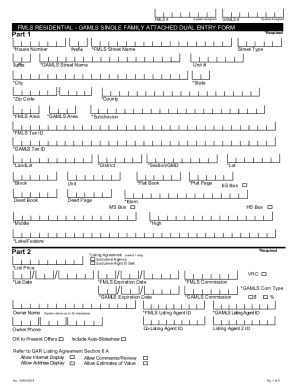
- Begin with Part 1 of the form. Fill in required fields, such as house number, street name, unit number, city, state, zip code, county, and areas. For each entry, ensure that you use accurate and up-to-date information.
- Proceed to Part 2, where you will enter details about the property listing. Complete essential fields like list price, owner name, listing agreement selection, and expiration dates. Make sure to provide accurate commission rates as required.
- In Part 3, focus on the property details. Enter the condition, dimensions, square footage, ownership type, and construction status. Ensure that you check the appropriate boxes for additional features, such as lot dimensions and year built.
- Complete Part 4 by filling in management details, HOA information, and any applicable finance options. Pay attention to the frequency and fees associated with the association.
- Move to Part 5 to fill out public remarks, ensuring clarity and adherence to the specified character limits for each section. This part is important for communicating property details to potential buyers.
- In Part 6, denote availability to receive offers, and enter private remarks if necessary. Be concise within character limits to convey important information effectively.
- Complete additional sections about property features, accessibility, and view for comprehensive coverage. Check all relevant features that apply to the property.
- Finally, review all entries for accuracy. After confirming all information is correct, you can save changes, download, print, or share the form as needed.
Get started today and complete your GA FMLS Residential GAMLS Single Family Attached Dual Entry Form online with ease.
Related links form
Industry-leading security and compliance
US Legal Forms protects your data by complying with industry-specific security standards.
-
In businnes since 199725+ years providing professional legal documents.
-
Accredited businessGuarantees that a business meets BBB accreditation standards in the US and Canada.
-
Secured by BraintreeValidated Level 1 PCI DSS compliant payment gateway that accepts most major credit and debit card brands from across the globe.