Loading
Form preview
  • US Legal Forms
  • Other Templates
  • More Forms
  • More Multi-State Forms
  • Au Oda 076 En 2023

Get Au Oda 076 En 2023-2026

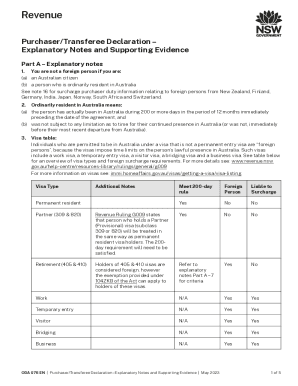
Revenue Purchaser/Transferee Declaration Explanatory Notes and Supporting Evidence Part A Explanatory notes 1.(a)(b)(c)You are not a foreign person if you are: an Australian citizen a person who is.

How it works

  1. Open form

    Open form follow the instructions

  2. Easily sign form

    Easily sign the form with your finger

  3. Share form

    Send filled & signed form or save

How to fill out the AU ODA 076 EN online

Filling out the AU ODA 076 EN form can seem complex, but this guide will provide you with clear, step-by-step instructions to make the process straightforward. Whether you are purchasing property or making a transfer, understanding each section of the form is essential for compliance and accuracy.

Follow the steps to successfully complete the AU ODA 076 EN form.

  1. Click 'Get Form' button to obtain the form and open it in the editor.
  2. Begin filling out your personal details in the designated fields. Ensure all information is accurate and corresponds with your identification documents.
  3. Indicate your residency status by selecting the appropriate options based on your citizenship or visa type. Reference the explanatory notes if you are unsure about your classification as a foreign person.
  4. Provide necessary supporting evidence, including certified copies of required documents, as specified in Part B of the form. Make sure these documents are prepared ahead of time for a smooth submission process.
  5. Review all filled-out sections to ensure accuracy and completeness. Pay extra attention to your contact information and any legal declarations.
  6. Once all sections are completed and double-checked, you can save your changes. From here, you have the option to download the form, print it for your records, or share it as needed.

Start completing your AU ODA 076 EN form online today!

Get form

Experience a faster way to fill out and sign forms on the web. Access the most extensive library of templates available.
Get form

Related content

Agency Request Budget
Jun 14, 2021 — Summary of Revenue Changes. The Oregon Department of Agriculture (ODA) is...
Learn more
UNU-WIDER Working Paper No. 2012/76 EU Aid
by P Nielson · 2012 · Cited by 5 — Union (AU) and especially with the powers given to...
Learn more
Doc 10075
The present document contains the texts of all resolutions of the ICAO Assembly in force...
Learn more

Related links form

IL IL-W-4 2007 IL Individual Purchaser Use Tax Transaction Return - Cook County IL Institute Substitute Form W-9 IL MFUT-12 1997

Questions & Answers

Get answers to your most pressing questions about US Legal Forms API.

Contact support

Voice calls or telephone typewriter (TTY) call 133 677 then ask for +61 2 7808 6900. Speak and listen service call 1300 555 727 then ask for +61 2 7808 6900. SMS relay service on 0423 677 767 then type +61 2 7808 6900.

The declaration enables the Office of State Revenue (OSR) to determine if the purchaser is a foreign person and liable to pay the 4% surcharge duty and land tax liabilities which were imposed earlier this year and also to maintain records on property transactions in NSW.

If you are not satisfied with an assessment or any decision made by the Chief Commissioner of State Revenue you can lodge an objection. Part 10, Division 1 of the Taxation Administration Act 1996 provides that an objection must: be made in writing. fully state the grounds for the objection and.

Objections must be lodged within 60 days of receipt of your assessment notice. Please also note that you must pay your assessment notice as its due despite lodging an objection or face interest penalty.

How to request a refund. To request a refund from Revenue NSW, download and complete a Request for refund of duty on an application to register a motor vehicle (PDF, 225.3 KB). You generally need to apply for a refund within 5 years of buying your motor vehicle.

You can call Revenue NSW on 1300 138 118 if you are in Australia or on +612 7808 6940 if you are calling from overseas. The operating hours are from 7:30am to 8:00pm Monday to Friday. You can also contact Revenue NSW in writing by mail or email or use the online service myPenalty.

Objections and appeals If you're not satisfied with any assessment of liability or decision, you can lodge a formal objection in writing. You have 60 days from the date of the assessment, or the decision, to lodge an objection. Your objection will be considered by independent staff who work in a separate review unit.

Objections and appeals If you're not satisfied with any assessment of liability or decision, you can lodge a formal objection in writing. You have 60 days from the date of the assessment, or the decision, to lodge an objection. Your objection will be considered by independent staff who work in a separate review unit.

Get This Form Now!

Use professional pre-built templates to fill in and sign documents online faster. Get access to thousands of forms.
Get form
If you believe that this page should be taken down, please follow our DMCA take down processhere.
Get AU ODA 076 EN
Get form
  • Adoption
  • Bankruptcy
  • Contractors
  • Divorce
  • Home Sales
  • Employment
  • Identity Theft
  • Incorporation
  • Landlord Tenant
  • Living Trust
  • Name Change
  • Personal Planning
  • Small Business
  • Wills & Estates
  • Packages A-Z
  • Affidavits
  • Bankruptcy
  • Bill of Sale
  • Corporate - LLC
  • Divorce
  • Employment
  • Identity Theft
  • Internet Technology
  • Landlord Tenant
  • Living Wills
  • Name Change
  • Power of Attorney
  • Real Estate
  • Small Estates
  • Wills
  • All Forms
  • Forms A-Z
  • Other Templates
  • Legal Hub
  • About Us
  • Help Portal
  • Legal Resources
  • Blog
  • Affiliates
  • Contact Us
  • Delete My Account
  • Site Map
  • Industries
  • Forms in Spanish
  • Localized Forms
  • State-specific Forms
  • Forms Kit
  • Real Estate Handbook
  • All Guides
  • Notarize
  • Incorporation services
  • For Consumers
  • For Small Business
  • For Attorneys
  • USLegal
  • FormsPass
  • pdfFiller
  • signNow
  • altaFlow
  • DocHub
  • Instapage
Form Packages
  • Adoption
  • Bankruptcy
  • Contractors
  • Divorce
  • Home Sales
  • Employment
  • Identity Theft
  • Incorporation
  • Landlord Tenant
  • Living Trust
  • Name Change
  • Personal Planning
  • Small Business
  • Wills & Estates
  • Packages A-Z
Form Categories
  • Affidavits
  • Bankruptcy
  • Bill of Sale
  • Corporate - LLC
  • Divorce
  • Employment
  • Identity Theft
  • Internet Technology
  • Landlord Tenant
  • Living Wills
  • Name Change
  • Power of Attorney
  • Real Estate
  • Small Estates
  • Wills
  • All Forms
  • Forms A-Z
  • Other Templates
Customer Service
  • Legal Hub
  • About Us
  • Help Portal
  • Legal Resources
  • Blog
  • Affiliates
  • Contact Us
  • Delete My Account
  • Site Map
  • Industries
  • Forms in Spanish
  • Localized Forms
  • State-specific Forms
  • Forms Kit
Legal Guides
  • Real Estate Handbook
  • All Guides
Prepared for you
  • Notarize
  • Incorporation services
Our Customers
  • For Consumers
  • For Small Business
  • For Attorneys
Our Sites
  • USLegal
  • FormsPass
  • pdfFiller
  • signNow
  • altaFlow
  • DocHub
  • Instapage
Social Media
Call us now toll free:
+1 833 426 79 33
As seen in:
© Copyright 1999-2026 airSlate Legal Forms, Inc. 17 Station Street, Ste. 203, Brookline, MA 02445
  • Your Privacy Choices
  • Terms of Service
  • Privacy Notice
  • Content Takedown Policy
  • Bug Bounty Program