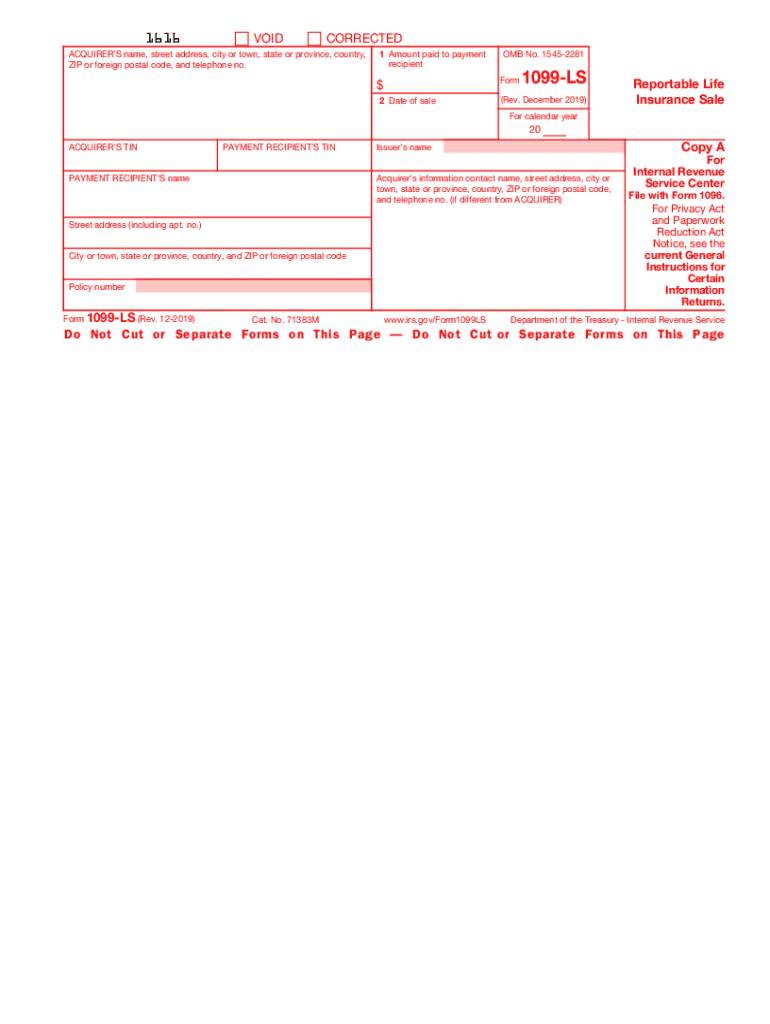
Attention: Copy A of this form is provided for informational purposes only. Copy A appears in red, similar to the official IRS form. The official printed version of Copy A of this IRS form is scannable,.

Open form follow the instructions

Easily sign the form with your finger

Send filled & signed form or save
How to fill out the IRS 1099-LS online
This guide provides clear and detailed instructions for users looking to fill out the IRS 1099-LS form online. By following these steps, you can ensure that you complete the form accurately and efficiently.
Follow the steps to fill out the IRS 1099-LS correctly.
- Click ‘Get Form’ button to access the IRS 1099-LS form online and open it in the editor.
- Enter the acquirer’s name, street address, city or town, state or province, country, ZIP or foreign postal code, and telephone number in the respective fields.
- Input the amount paid to the payment recipient in Box 1. This represents the total payment made during the reportable life insurance sale.
- Fill in the date of the sale in Box 2. Ensure that the date reflects when the transaction occurred.
- Provide the acquirer’s taxpayer identification number (TIN) and the payment recipient’s TIN. This information is crucial for tax reporting purposes.
- Include the payment recipient’s name in the designated field to correctly identify the individual or entity receiving the payment.
- If necessary, add any additional contact information for the acquirer, especially if different from the previously entered details.
- Review all the provided information for accuracy to avoid penalties. Ensure that all required fields are completed.
- Once you have filled out the form, save the changes, and choose to download, print, or share the completed IRS 1099-LS as needed.
Begin filling out the IRS 1099-LS form online to ensure your compliance and accurate reporting.
Experience a faster way to fill out and sign forms on the web. Access the most extensive library of templates available.
Related content
Mar 24, 2023 — File Form 1099-LS if you are the acquirer of a life insurance contract...
7 days ago — New Form 1099-LS. •. EFIN Application. •. Filing Dates for E- File...
Feb 19, 2021 — Our provisions for income taxes for 2020 and 2019 also included tax...
Get answers to your most pressing questions about US Legal Forms API.
What happens if you don't report a 1099 S?
If the business or other party involved in the real estate transaction submits a 1099-S form to the IRS, as they are required to do by law, and a taxpayer does not report it, the IRS will likely send a bill for taxes owed on the income. Taxpayers do not have to include 1099s with their tax returns submitted to the IRS.
Can I file taxes without 1099 s?
As a self-employed individual, you must track receipts for tax deductions and keep clean records of your income for the IRS if you don't want to pay 1099 taxes. With good record-keeping, you will be able to file taxes on your self-employment income even if you don't receive 1099.
Do I have to report a 1099 LS on my tax return?
File Form 1099-LS if you are the acquirer of a life insurance contract, or any interest in a life insurance contract, in a reportable policy sale. See the Instructions for Form 1009-LS for complete filing requirements.
Who is exempt from filing 1099s?
Trusts and nonprofit organizations are usually exempt from taxes, so you don't need to send them a 1099 form. However, if you're a tax-exempt organization, you must fill out and send this form to independent contractors, vendors, attorneys and other parties, says the IRS.
Do I have to report a 1099-S on my tax return?
If the 1099-S was for a timeshare or vacation home, it's considered a personal capital asset to you and the sale is reportable on Federal Form 8949 and Schedule D. A gain on this sale is reportable income.
Why did I get a 1099 for life insurance?
If you own a life insurance policy, the 1099-R could be the result of a taxable event, such as a full surrender, partial withdrawal, loan or dividend transaction. If you own an annuity, the 1099-R could be the result of a full surrender, a partial withdrawal or the transfer of the contract to a new owner.
How do you report a 1099 S on your tax return?
Personal Use. If you're reporting Form 1099-S because you sold your primary residence, then you'll report the sale of the home on Form 8949 and Schedule D. If you're reporting Form 1099-S because you sold a timeshare or vacation home, then you'll also report the sale on Form 8949 and Schedule D.
What is a reportable life insurance sale?
A “reportable policy sale” is defined generally as the acquisition of an interest in a life insurance contract, directly or indirectly, if the acquirer has no substantial family, business, or financial relationship with the insured (apart from the acquirer's interest in the life insurance contract).
Use professional pre-built templates to fill in and sign documents online faster. Get access to thousands of forms.
If you believe that this page should be taken down, please follow our DMCA take down process here.