Loading
Get Canada 0161e - Ontario 2020-2026
How it works
-

Open form follow the instructions
-

Easily sign the form with your finger
-

Send filled & signed form or save
How to fill out the Canada 0161E - Ontario online
The Canada 0161E - Ontario form is essential for notifying the Ontario Immigrant Nominee Program (OINP) of any changes to your personal information or circumstances. This guide provides clear, step-by-step instructions to help you complete the form accurately and efficiently.
Follow the steps to fill out your Canada 0161E - Ontario form online.
- Click ‘Get Form’ button to obtain the form and open it in the editor.
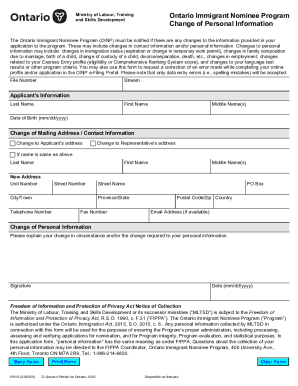
- In the 'File Number' section, enter your assigned file number provided during your initial application process.
- Select the stream you are applying under from the dropdown menu, which should reflect your original application type.
- In the 'Applicant’s Information' section, fill in your last name, first name, and middle name(s) as they appear on your official documents. Include your date of birth in the format (mm/dd/yyyy).
- If you're changing your mailing address or contact information, indicate which address is being changed: applicant’s address or representative’s address. If it is the same as your name above, repeat your last and first name.
- Provide your new address details, including the unit number (if applicable), street number, city or town, street name, province or state, postal code or zip code, and your telephone number. Include your email address if available.
- In the 'Change of Personal Information' section, explain your change in circumstances clearly. Specify what needs to be updated regarding your immigration status, employment, or family composition.
- Sign the form to confirm the accuracy of the information provided, and enter the date (mm/dd/yyyy) of your signature.
- Once you have completed all sections, you can save your changes, download a copy for your records, print the form directly, or share it as needed.
Complete your Canada 0161E - Ontario form online today to ensure your information is up to date.
Related links form
After you submit your application, you will get an email to confirm that we have received it. You can check the status of your application through your account in the OINP e-Filing Portal at any time. For regular updates on processing times, read OINP Application processing times and nominations issued.