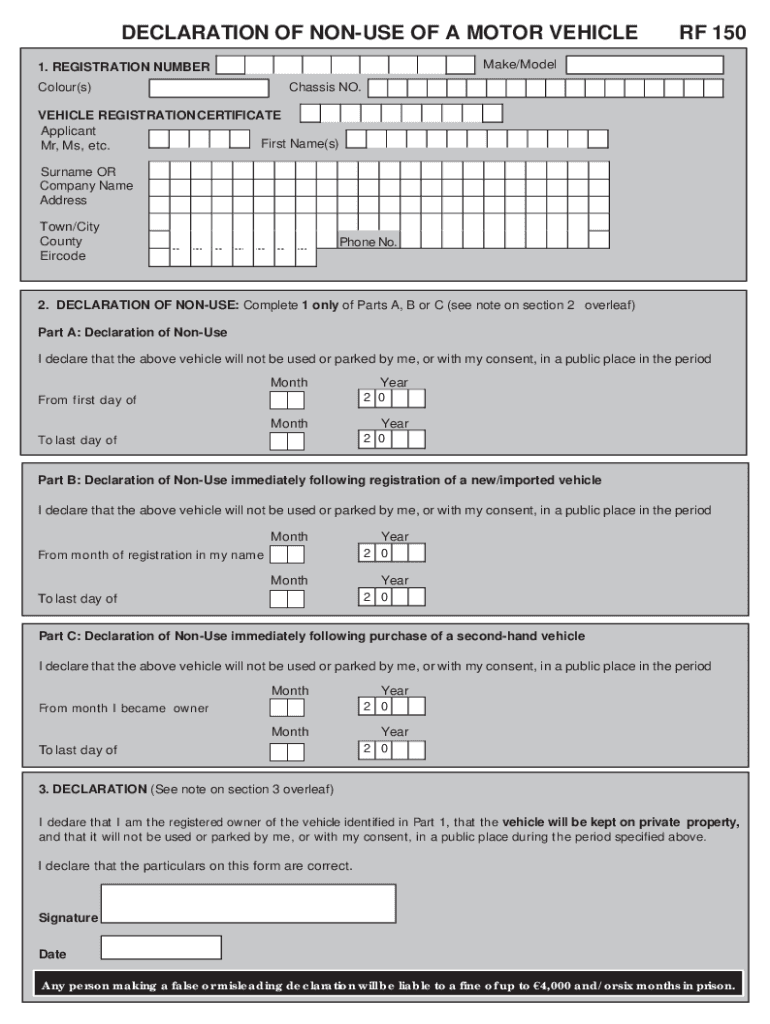
E Address Town/City County Eircode Phone No. 2. DECLARATION OF NON-USE: Complete 1 only of Parts A, B or C (see note on section 2 overleaf) Part A: Declaration of Non-Use I declare that the above vehicle will not be used or parked by me, or with my consent, in a public place in the period Month Year 2 0 Month Year 2 0 From first day of To last day of Part B: Declaration of Non-Use immediately following registration of a new/imported vehicle I declare that the above vehicle will not be use.
Loading

Open form follow the instructions

Easily sign the form with your finger

Send filled & signed form or save
How to fill out the IE RF 150 online
The IE RF 150 form is essential for declaring non-use of a motor vehicle, allowing users to officially indicate that their vehicle will not be used in public spaces for a specified time. This guide provides step-by-step instructions on how to complete this form accurately and efficiently online.
Follow the steps to effectively complete the IE RF 150 form.
- Click the ‘Get Form’ button to access the IE RF 150 form and open it in the online editor.
- In Section 1, input the vehicle details such as the registration number, make and model, colour, and chassis number. Ensure that the applicant's name matches the name on the Vehicle Registration Certificate.
- Provide the applicant's information, including their first name, surname or company name, address, town or city, county, eircode, and phone number.
- Proceed to Section 2 and select one of the three parts (A, B, or C) to declare non-use based on your situation. Fill out the fields for the applicable time period. Ensure the dates align with the required regulations.
- In Part A, you must declare the period during which the vehicle will not be used after the current license or non-use declaration expires. In Part B, include the registration month and year if the vehicle is newly registered. In Part C, specify the ownership transfer month and year if the vehicle is second-hand.
- Complete Section 3 by confirming you are the registered owner of the vehicle. Sign and date the form to validate your declaration. Remember, signatures must correspond to the registered owner or an authorized representative, as stated in the guidelines.
- After filling out the form, carefully review all the entered information for accuracy. Once confirmed, you can save changes, download, print, or share the completed IE RF 150 form.
Complete the IE RF 150 form online today to ensure your vehicle's non-use is officially recorded.
Experience a faster way to fill out and sign forms on the web. Access the most extensive library of templates available.
Related content
Nov 13, 1984 — :; .. &", . ~ o c: ",~ .. ~;. 5ez~. ~ ! ~. • .. lLi ,'". ~I. : ; ;':,;;...
BLAH 1000-I E Amplifier 15-400 MHz (OSM) · BLA 2000-I Amplifier 300 MHz (OSM) ... BLAXH2H...
Rf 150 form. Motor Tax Forms Wicklow.ie WebForm RF 150 Declaration of Non –Use of a...
Get answers to your most pressing questions about US Legal Forms API.
How do I pay my car tax Ireland?
To pay motor tax, you can tax your vehicle online, visit your local motor tax office or request the forms and complete them by post. A motor tax disc is issued for 3, 6 or 12 months and how the rate is calculated depends on your type of vehicle.
What is the motor tax arrears in Ireland?
Motor Tax Arrears are charged: If a month or more has lapsed between the expiry of your last tax disc or Statutory Off Road Declaration and the month in which you want to tax your vehicle.
How do I declare my car off the road in Ireland?
If your vehicle is not going to be used or kept in a public place, you will be able to declare it off the road by completing Form RF150 (pdf) and submitting it to your local Motor Tax Office. Alternatively, you can declare your vehicle off the road at .motortax.ie if you know your Personal Access Number (PIN).
How do I tax a car I just bought in Ireland?
You cannot tax your new vehicle until the change of ownership has been registered. You can check the status of the vehicle on motortax.ie. You then renew the motor tax on the vehicle using Form RF100A or online as described in 'How to apply'.
Can I drive a car I just bought Ireland?
New car owners must have at least third party cover to drive their vehicle legally on the road. Without this, you are breaking the law. Before you drive off with your new car, you must have the motor insurance disc on the windscreen to drive in a public place.
Do I have to pay back tax on a car I just bought Ireland?
For a second hand vehicle (taxed before), motor tax arrears (back tax) become due from the beginning of the month after sale. For a brand new/imported vehicle, motor tax arrears become due from the beginning of the month after registration.
Do you have to back pay car tax in Ireland?
For a second hand vehicle (taxed before), motor tax arrears (back tax) become due from the beginning of the month after sale. For a brand new/imported vehicle, motor tax arrears become due from the beginning of the month after registration.
Use professional pre-built templates to fill in and sign documents online faster. Get access to thousands of forms.
If you believe that this page should be taken down, please follow our DMCA take down process here.