Loading
Form preview
  • US Legal Forms
  • Form Library
  • More Forms
  • More Multi-State Forms
  • Ny Ac 3326-s 2017

Get Ny Ac 3326-s 2017-2026

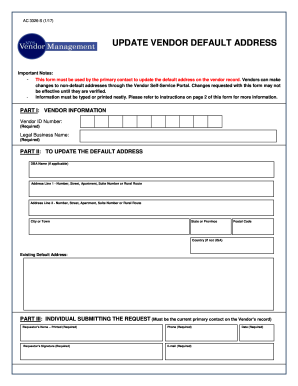
-default addresses through the Vendor Self-Service Portal. Changes requested with this form may not be effective until they are verified. Information must be typed or printed neatly. Please refer to instructions on page 2 of this form for more information. PART I: VENDOR INFORMATION Vendor ID Number: (Required) Legal Business Name: (Required) PART II: TO UPDATE THE DEFAULT ADDRESS DBA Name (if applicable) Address Line 1 - Number, Street, Apartment, Suite Number or Rural Route Address Line 2.

How it works

  1. Open form

    Open form follow the instructions

  2. Easily sign form

    Easily sign the form with your finger

  3. Share form

    Send filled & signed form or save

How to fill out the NY AC 3326-S online

The NY AC 3326-S form is essential for vendors looking to update their default address within New York State's vendor database. This guide provides a clear, step-by-step approach to completing the form online, ensuring accuracy and efficiency in your submission.

Follow the steps to successfully update your vendor address.

  1. Use the ‘Get Form’ button to retrieve the form and open it in your chosen online editor.
  2. In Part I, provide your vendor information: enter your Vendor ID number in the designated field and input your legal business name as it appears in official documents.
  3. Move to Part II to update the default address. If applicable, enter your DBA name, followed by the new address details including Address Line 1, Address Line 2, town or city, state or province, postal code, and country if outside the USA.
  4. Fill in the existing default address in the dedicated field to clarify the address you wish to change.
  5. In Part III, complete all required fields regarding the individual submitting the request. Clearly print the requestor’s name, provide a valid phone number, enter your email address, and ensure you date the request.
  6. Review your entries for accuracy and completeness before submitting the form.
  7. Upon completion, save your changes, and you may choose to download, print, or share the form as needed for submission.

Get started on filling out your NY AC 3326-S form online and ensure your vendor information is current.

Get form

Experience a faster way to fill out and sign forms on the web. Access the most extensive library of templates available.
Get form

Related content

Amyloid processing and signal transduction...
by MBH Youdim · 2003 · Cited by 40 — Ann N Y Acad Sci. 2003 May;993:378-86 ... TV3326...
Learn more
NEW YORK STATE CONTROLLED SUBSTANCES ACT
§ 3326. Institutional research licenses. 1. Subject to the ... Possession of a blank...
Learn more
Heat Response Plans
Air conditioning is a key intervention to prevent exposure to extreme heat. ... Ito, and...
Learn more

Related links form

AZ Form 835 2007 AZ Form 836 2014 AZ GAO-W-9 2015 AZ GAO-W-9 2010

Questions & Answers

Get answers to your most pressing questions about US Legal Forms API.

Contact support

The Vendor ID is a ten-digit identifier issued by New York State when the vendor is registered on the Statewide Vendor File. This number must now be included on the questionnaire. If the business entity has not obtained a Vendor ID, contact the IT Service Desk at ITServiceDesk@osc.state.ny.us or call 866-370-4672.

1. The SFS Vendor ID is a provider's Statewide Financial System Vendor Identification number. To receive grant payments providers must have an established SFS Vendor ID. 2. An SFS Vendor ID is 10 digits long.

Companies that are not currently registered with the Vendor File should contact OSC's Helpdesk. Once the registration is processed and approved, the new vendor will be given a unique 10-digit Vendor Identification Number for use on all future transactions with all New York State agencies.

Alternatively called a VID, a vendor ID is a unique number assigned to each piece of computer hardware. The vendor ID helps a computer identify the hardware being installed in the computer. Most vendor IDs start with 0x, like 0x9710 or 9710.

Alternatively called a VID, a vendor ID is a unique number assigned to each piece of computer hardware. The vendor ID helps a computer identify the hardware being installed in the computer. Most vendor IDs start with 0x, like 0x9710 or 9710.

Vendors registered with a NYS Vendor ID* can use the Vendor Self-Service Portal on the Statewide Financial System (SFS) to check the status of invoices, purchase orders and payments, submit electronic invoices, and update contact and address information and enroll in various State programs and initiatives (for example, ...

The Vendor ID is a ten-digit identifier issued by New York State when the vendor is registered on the Statewide Vendor File. This number must now be included on the questionnaire. If the business entity has not obtained a Vendor ID, contact the IT Service Desk at ITServiceDesk@osc.state.ny.us or call 866-370-4672.

Is an EIN the same as a NYS vendor ID number? An employer identification number (EIN) or federal tax identification number is different than a NYS vendor ID number. An EIN is issued by the IRS and is used to identify a business entity and federal business tax returns.

Get This Form Now!

Use professional pre-built templates to fill in and sign documents online faster. Get access to thousands of forms.
Get form
If you believe that this page should be taken down, please follow our DMCA take down processhere.
Get NY AC 3326-S
Get form
  • Adoption
  • Bankruptcy
  • Contractors
  • Divorce
  • Home Sales
  • Employment
  • Identity Theft
  • Incorporation
  • Landlord Tenant
  • Living Trust
  • Name Change
  • Personal Planning
  • Small Business
  • Wills & Estates
  • Packages A-Z
  • Affidavits
  • Bankruptcy
  • Bill of Sale
  • Corporate - LLC
  • Divorce
  • Employment
  • Identity Theft
  • Internet Technology
  • Landlord Tenant
  • Living Wills
  • Name Change
  • Power of Attorney
  • Real Estate
  • Small Estates
  • Wills
  • All Forms
  • Forms A-Z
  • Form Library
  • Legal Hub
  • About Us
  • Help Portal
  • Legal Resources
  • Blog
  • Affiliates
  • Contact Us
  • Delete My Account
  • Site Map
  • Industries
  • Forms in Spanish
  • Localized Forms
  • State-specific Forms
  • Forms Kit
  • Real Estate Handbook
  • All Guides
  • Notarize
  • Incorporation services
  • For Consumers
  • For Small Business
  • For Attorneys
  • USLegal
  • FormsPass
  • pdfFiller
  • signNow
  • altaFlow
  • DocHub
  • Instapage
Form Packages
  • Adoption
  • Bankruptcy
  • Contractors
  • Divorce
  • Home Sales
  • Employment
  • Identity Theft
  • Incorporation
  • Landlord Tenant
  • Living Trust
  • Name Change
  • Personal Planning
  • Small Business
  • Wills & Estates
  • Packages A-Z
Form Categories
  • Affidavits
  • Bankruptcy
  • Bill of Sale
  • Corporate - LLC
  • Divorce
  • Employment
  • Identity Theft
  • Internet Technology
  • Landlord Tenant
  • Living Wills
  • Name Change
  • Power of Attorney
  • Real Estate
  • Small Estates
  • Wills
  • All Forms
  • Forms A-Z
  • Form Library
Customer Service
  • Legal Hub
  • About Us
  • Help Portal
  • Legal Resources
  • Blog
  • Affiliates
  • Contact Us
  • Delete My Account
  • Site Map
  • Industries
  • Forms in Spanish
  • Localized Forms
  • State-specific Forms
  • Forms Kit
Legal Guides
  • Real Estate Handbook
  • All Guides
Prepared for you
  • Notarize
  • Incorporation services
Our Customers
  • For Consumers
  • For Small Business
  • For Attorneys
Our Sites
  • USLegal
  • FormsPass
  • pdfFiller
  • signNow
  • altaFlow
  • DocHub
  • Instapage
Social Media
Call us now toll free:
+1 833 426 79 33
As seen in:
© Copyright 1999-2026 airSlate Legal Forms, Inc. 3720 Flowood Dr, Flowood, Mississippi 39232
  • Your Privacy Choices
  • Terms of Service
  • Privacy Notice
  • Content Takedown Policy
  • Bug Bounty Program