Loading
Get Light Vehicle Inspection Manualtruckvehicles - Scribd
How it works
-

Open form follow the instructions
-

Easily sign the form with your finger
-

Send filled & signed form or save
How to use or fill out the Light Vehicle Inspection ManualTruckVehicles - Scribd online
Completing the Light Vehicle Inspection ManualTruckVehicles online can seem daunting, but this guide will help you navigate the process with ease. Follow these steps to ensure you fill out the form accurately and efficiently.
Follow the steps to fill out the Light Vehicle Inspection ManualTruckVehicles online.
- Press the ‘Get Form’ button to access the form and open it in your editing platform.
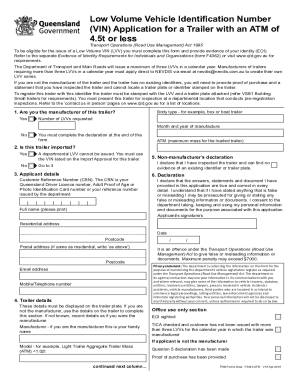
- Begin by determining if you are the manufacturer of the trailer. Answer ‘Yes’ or ‘No’ to the initial question provided on the form.
- If applicable, specify the body type of the trailer, such as a box or boat trailer, and indicate the number of Low Volume VINs (LVVs) you are requesting along with the month and year of manufacture.
- Indicate whether the trailer is imported by selecting ‘Yes’ or ‘No’. If it is imported, you will need to use the VIN listed on the Import Approval.
- Fill in your applicant details, including your Customer Reference Number (CRN), full name, residential address, and contact information.
- If you are not the manufacturer, complete the non-manufacturer’s declaration by confirming that you have inspected the trailer and found no existing identifier.
- Provide a declaration where you affirm that all information you provided is accurate and true. Ensure to sign the form, enter the date, and provide your postal address if it differs from the residential address.
- Once completed, review all the entries for accuracy. Save your changes, and then download or print the form.
- Share the completed form as required, ensuring you retain a copy for your records.
Start completing your Light Vehicle Inspection ManualTruckVehicles online today!
Why Did My Vehicle Fail the Inspection? Unsafe brakes. Poor emissions. Broken windshield wipers. Missing or broken exterior lights. Seatbelt failures. Exhaust system malfunctions. Bald tires. Rebuilt Airbags.