Loading
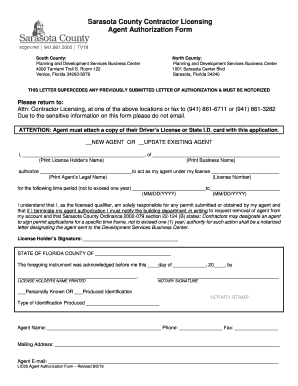
Get Attention: This Is For State Certified ... - Sarasota County
How it works
-

Open form follow the instructions
-

Easily sign the form with your finger
-

Send filled & signed form or save
How to fill out the ATTENTION: THIS IS FOR STATE CERTIFIED ... - Sarasota County online
Filling out the ATTENTION: THIS IS FOR STATE CERTIFIED ... form online can streamline your contractor licensing process in Sarasota County. This guide provides clear, step-by-step instructions to assist you in completing the form accurately and efficiently.
Follow the steps to successfully fill out the form online.
- To begin, click the ‘Get Form’ button to access the form and open it in your preferred document editor.
- Identify whether you are a new agent or updating an existing agent by marking the appropriate selection on the form.
- In the first section, print the license holder’s name as required.
- Next, fill in the business name in the designated area.
- Authorize your agent by printing their legal name in the corresponding space.
- Provide your agent's license number where indicated.
- Specify the time period for the agent's authorization by filling in the start and end dates (MM/DD/YYYY). Ensure this time frame does not exceed one year.
- Review the statement indicating your understanding of the responsibility for any permits submitted by your agent.
- Sign the form in the space designated for the license holder’s signature.
- Arrange for the form to be notarized, including the notary’s signature and stamp.
- Fill out the identification information of the notary, indicating how the notary acknowledged the license holder.
- Lastly, complete the agent's contact information, including their phone number, fax number, mailing address, and email.
Complete your forms online for a smoother licensing process today!