Loading
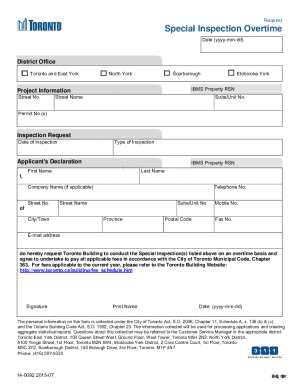
Get Special Inspection Overtime Request. Request
How it works
-

Open form follow the instructions
-

Easily sign the form with your finger
-

Send filled & signed form or save
How to fill out the Special Inspection Overtime Request online
Completing the Special Inspection Overtime Request is a straightforward process that ensures timely inspections for your project. This guide will provide clear, step-by-step instructions to help you fill out the form accurately and efficiently.
Follow the steps to successfully complete your request.
- Click the ‘Get Form’ button to access the Special Inspection Overtime Request form and open it for editing.
- Enter the date of your request in the format yyyy-mm-dd. This date should reflect when the request is being made.
- Select the relevant district office from the options provided, including Toronto and East York, North York, Scarborough, or Etobicoke York.
- Fill out the IBMS property RSN field and provide project information by entering the street number and street name. If applicable, include the suite or unit number.
- Provide your permit number(s) if they are associated with this inspection request.
- Indicate the date of inspection and select the type of inspection you require.
- In the Applicant's Declaration section, enter your first name and last name. If applicable, include your company name.
- Complete the address fields, including street number, street name, suite or unit number, city/town, province, postal code, and contact numbers (telephone and mobile). Also, provide your email address.
- Read the declaration statement carefully, confirming your request for overtime inspection and agreeing to pay applicable fees as per the City of Toronto Municipal Code. For the fee schedule, refer to the link provided in the form.
- Sign the form and print your name. Include the date of signing in the specified format.
- Once you have completed all sections, review your information for accuracy. You may now save your changes, download, print, or share the form as needed.
Complete your Special Inspection Overtime Request online today to ensure prompt processing.