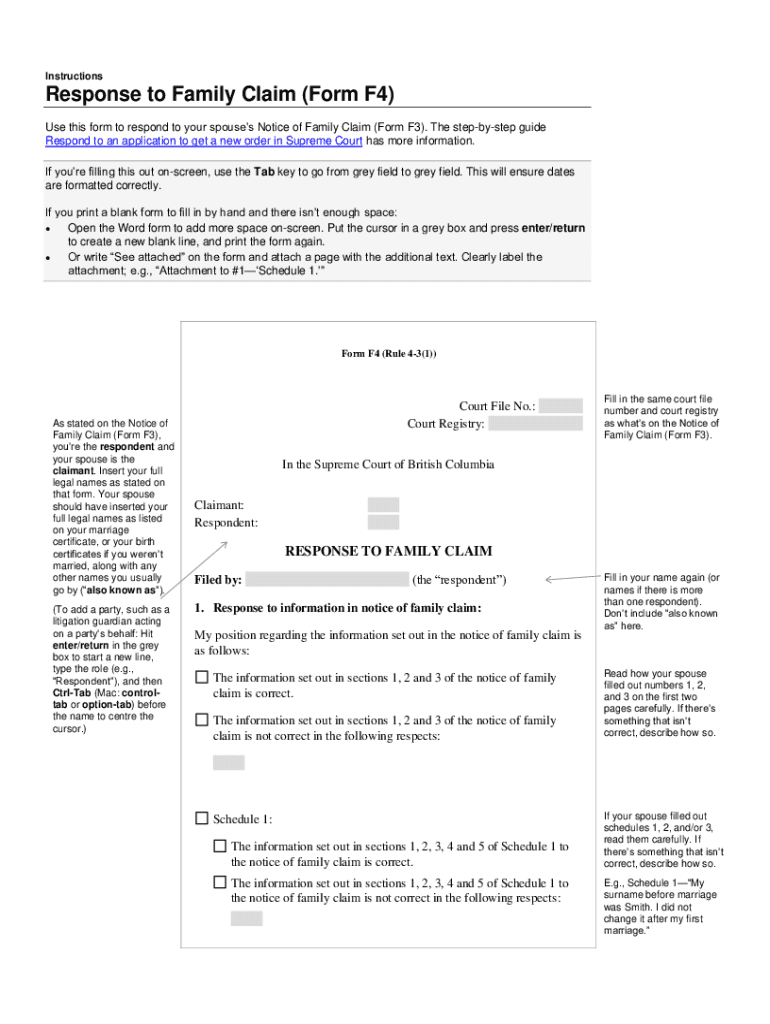
Supreme Court has more information. If you re filling this out on-screen, use the Tab key to go from grey field to grey field. This will ensure dates are formatted correctly. If you print a blank form to fill in by hand and there isn t enough space: Open the Word form to add more space on-screen. Put the cursor in a grey box and press enter/return to create a new blank line, and print the form again. Or write See attached on the form and attach a page with the additional text.
Loading

Open form follow the instructions

Easily sign the form with your finger

Send filled & signed form or save
How to fill out the Canada Form F4 online
Filling out the Canada Form F4 online can seem overwhelming at first, but with guidance, you can complete the process with confidence. This form is essential for responding to a spouse’s Notice of Family Claim, and following the steps outlined below will help ensure that your submission is accurate and complete.
Follow the steps to successfully complete the form online.
- Click ‘Get Form’ button to access the form. This will allow you to download and open it in your preferred editor.
- Begin by entering your full legal name as stated on the Notice of Family Claim (Form F3). Ensure accuracy as this identifies you as the respondent. Include any other names you are commonly known by in the 'also known as' section.
- Input the court file number and court registry as they appear on the Notice of Family Claim. This information is crucial for the court to process your response correctly.
- Provide your response to the information presented in the Notice of Family Claim. You can affirm whether the details are correct or provide corrections, especially regarding sections 1, 2, and 3.
- Review the Schedules attached to the Notice of Family Claim carefully. Indicate whether you agree or disagree with the claims and provide explanations as necessary for any disagreements.
- Fill in your address for service where you can receive court documents. If the court registry is more than 30 kilometers away, also include an optional email address or fax number.
- Date your signature in the format dd/Mmm/yyyy (01/Jan/2021) to ensure it is processed correctly, and provide your signature or your lawyer's signature if you are represented.
- If required, acknowledge if you need to file a Financial Statement (Form F8) based on the claims made against you. Ensure all required documentation is attached.
- Review the entire form for accuracy. Once completed, you can save changes, download, print, or share the form as needed.
Start filling out your Canada Form F4 online today to ensure your response is submitted promptly and accurately.
Experience a faster way to fill out and sign forms on the web. Access the most extensive library of templates available.
Related content
If this form is filed to register additional securities for an offering pursuant to Rule...
A registrant must file the Form F-4 registration statement in electronic format ... Since...
May 28, 2019 — In connection with this annual report on Form 20-F of Canada Goose...
Get answers to your most pressing questions about US Legal Forms API.
What is an f4 filing?
Form F-4Opens in a new window is a registration statement used to register securities issued by a foreign private issuer in connection with certain business combinations, exchange offers, reclassifications, mergers, consolidations and asset transfers.
Who files an F-4?
SEC Form F-4 is a filing that the U.S. Securities and Exchange Commission (SEC) requires for the registration of certain securities by foreign issuers. SEC Form F-4 supports the registration of securities involving foreign private issuers in connection with exchange offers and business combinations.
When must a Form 4 be filed?
A Form 4 must be filed before the end of the second business day following a change in ownership of securities or derivative securities (including the exercise or grant of stock options) for individuals subject to Section 16 of the Securities Exchange Act of 1934.
Is a Form 4 good or bad?
Form 4 filings can potentially provide investors with trading signals. Insiders have an information advantage over other investors and studies show a link between their trades and stock performance. A Form 4 filing that shows a significant purchase or sale can be a good starting point to further investigate a stock.
What triggers a Form 4 filing?
What's a Form 4? In most cases, when an insider executes a transaction, he or she must file a Form 4. With this form filing, the public is made aware of the insider's various transactions in company securities, including the amount purchased or sold and the price per share.
Use professional pre-built templates to fill in and sign documents online faster. Get access to thousands of forms.
If you believe that this page should be taken down, please follow our DMCA take down process here.