Loading
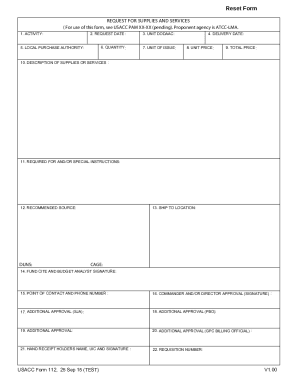
Get Dod Usacc Form 112 2015-2026
How it works
-

Open form follow the instructions
-

Easily sign the form with your finger
-

Send filled & signed form or save
How to fill out the DOD USACC Form 112 online
Filling out the DOD USACC Form 112 is essential for requesting supplies and services effectively. This guide aims to assist users in completing the form online with step-by-step instructions.
Follow the steps to complete the DOD USACC Form 112 online efficiently.
- Click ‘Get Form’ button to obtain the form and open it in the editor.
- In the 'Activity' field, enter the name of the activity making the supply request. This helps identify the department responsible for the requisition.
- Fill in the 'Request Date' with the date you are submitting the request. Use the format MM/DD/YYYY for clarity.
- Specify the 'Quantity' of supplies or services you are requesting. Ensure this number is accurate to meet your operational needs.
- Indicate whether you have local purchase authority by choosing 'Yes' or 'No' in the 'Local Purchase Authority' section.
- Enter the 'Unit DODAAC,' which is the Department of Defense Activity Address Code for your unit.
- Fill out the 'Delivery Date' to indicate when you expect the supplies or services to be delivered.
- Specify the 'Unit of Issue' which refers to the measurement unit for the supplies requested (e.g., each, box, cart, etc.).
- Input the 'Unit Price' which is the cost associated with each unit of the supply or service requested.
- Calculate and enter the 'Total Price' as the product of the quantity and unit price.
- Provide a detailed 'Description of Supplies or Services' to ensure clarity about what is being requested.
- Add any 'Required For and/or Special Instructions' that may assist in processing your request effectively.
- Indicate the 'Recommended Source' for supplying the requested items, if applicable.
- Fill in the 'Ship To Location' indicating where the supplies should be sent once they are ready.
- Write the 'Fund Cite and Budget Analyst Signature' as necessary to authorize funding for the transaction.
- Provide the 'Point of Contact and Phone Number' for any follow-up regarding the request.
- Obtain the 'Commander and/or Director Approval (Signature)', as necessary, to validate the requisition.
- If applicable, include additional approvals such as ‘SJA’ or ‘PBO’ by obtaining the necessary signatures.
- Add any further approvals required for processing the requisition, as necessary.
- Document the 'Hand Receipt Holders Name, UIC, and Signature' for tracking and accountability on the requested supplies.
- Finally, enter the 'Requisition Number' assigned to the request for record-keeping purposes.
- Review your entries for accuracy and completeness. Once completed, save your changes, and you can also download, print, or share the form as needed.
Complete your DOD USACC Form 112 online today to ensure your request is processed smoothly.
A review of the AR 385-10 shows us that all safety related programs within the Army are comprised of five core elements— • Safety program management. Hazard identification through Inspections/assessments. Hazard analysis and countermeasures (see DA Pam 385–10). Safety promotion, training and education.