Loading
Get Ca Soc 426a (tagalog) 2016-2026
How it works
-

Open form follow the instructions
-

Easily sign the form with your finger
-

Send filled & signed form or save
How to fill out the CA SOC 426A (Tagalog) online
Filling out the CA SOC 426A form online can be a straightforward process when you follow clear instructions. This guide provides step-by-step assistance, ensuring you complete the form accurately.
Follow the steps to complete the CA SOC 426A (Tagalog) form online.
- Click ‘Get Form’ button to obtain the form and open it in the editor.
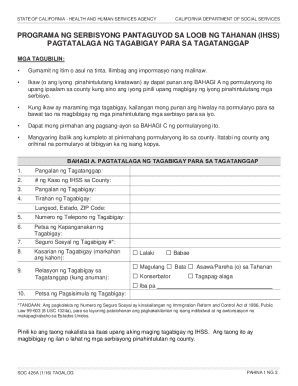
- In Part A, enter the name of the recipient at field one, followed by the IHSS case number in field two. When listing the provider's name and address in fields three and four, ensure all information is printed clearly.
- Next, provide the provider's phone number in field five, followed by their date of birth in field six and social security number in field seven. Remember to fill out fields eight and nine regarding the provider's gender and relationship to the recipient.
- In field ten, select the provider's start date. Make sure all relevant boxes are checked appropriately for gender and relationship.
- Proceed to Part B, where you acknowledge and agree to the conditions set forth. Read each statement closely and ensure you understand your responsibilities and the provider's registration requirements.
- Finally, in Part C, provide your signature and date at the bottom of the form. If you have an authorized representative, they should also sign and date.
- After completing the form, make sure to save your changes, download a copy, and share the completed document as necessary with the county.
Start filling out your CA SOC 426A form online today for a smooth experience.
CALIFORNIA DEPARTMENT OF SOCIAL SERVICES. IN-HOME SUPPORTIVE SERVICES (IHSS) PROGRAM. PROVIDER ENROLLMENT FORM.