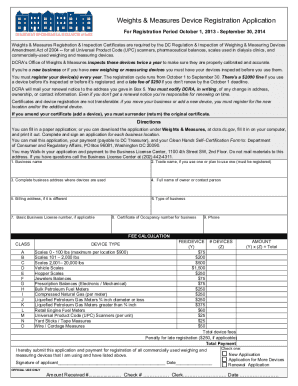
For Registration Period October 1, 2013 - September 30, 2014 Weights & Measures Registration & Inspection Certificates are required by the DC Regulation & Inspection of Weighing & Measuring Devices Amendment Act of 2004 -- for all Universal Product Code (UPC) scanners, pharmaceutical balances, scales used in dialysis clinics, and commercially-used weighing and measuring devices. DCRA s Office of Weights & Measures inspects these devices twice a year to make sure they are properly calibrated a.

How it works
  • Open form

    Open form follow the instructions

  • Easily sign form

    Easily sign the form with your finger

  • Share form

    Send filled & signed form or save

How to fill out the DC Weights & Measures Device Registration Application online

Completing the DC Weights & Measures Device Registration Application is an essential step for businesses using weighing and measuring devices. This guide provides step-by-step instructions to help you navigate the online application process easily and efficiently.

Follow the steps to fill out your registration application

  1. Click ‘Get Form’ button to obtain the form and open it in the online editor.
  2. Provide your business name in the designated field. Ensure that this name matches what is registered with the appropriate authorities.
  3. If you utilize a trade name, indicate it here. This name also needs to be registered for compliance.
  4. Complete the full business address where the devices will be utilized. Confirm that this address is current and accurate.
  5. Enter the full name of the owner or the designated contact person for the application.
  6. If your billing address differs from the business address, provide it in this section.
  7. Select the type of business you operate from the available options provided in the form.
  8. Input your Basic Business License number if applicable. This may be necessary for the registration process.
  9. Add your Certificate of Occupancy number for the business into the respective field.
  10. Include a valid phone number for contact purposes.
  11. Calculate the total fees based on the devices you register. Enter specific details for each device type and the associated fees according to the guidelines provided.
  12. Review your application for accuracy. Ensure all required information is filled in correctly before submitting.
  13. Once completed, users can save changes, download, print, or share the form as necessary. Make sure to keep a copy for your records.

Ensure your devices are registered by filling out the application online today.

Get form

Experience a faster way to fill out and sign forms on the web. Access the most extensive library of templates available.

Related content

Office of Weights and Measures | DLCP - DC.gov

Welcome to the Department of Licensing and Consumer Protection (DLCP) Business and...

Learn more
Business and Professional Licensing Administration...

... Weights and Measures · Office of Weights & Measures. Divisions. Business and...

Learn more
Office of Weights and Measures | DLCP - DC.gov

Welcome to the Department of Licensing and Consumer Protection (DLCP) Business and...

Learn more
Questions & Answers

Get answers to your most pressing questions about US Legal Forms API.

Contact support

What is the office of weights and measures?

OWM establishes uniformity, equity, SI use, and traceability in weights and measures by advancing national and international legal metrology standards, procedures, capabilities, and training.

As the name suggests, the Department of Legal Metrology, relates to the units of weights and measures, methods of measurements and measuring instruments and the regulatory safeguards to the public. The Department of Legal Metrology is one of the important organs of Consumers' Protection.

All Basic Business License (BBL) and associated public license information can be verified via SCOUT. Also, a BBL can be verified by calling the Business Licensing Division at (202) 442-4311.

OPL's system requires a free, single sign-on, Access DC account to submit renewal applications. To sign up for a free Access DC account, please visit our sign-up page. If you already have an Access DC account, you may proceed to submit a new application or a renewal application.

Get This Form Now!

Use professional pre-built templates to fill in and sign documents online faster. Get access to thousands of forms.

If you believe that this page should be taken down, please follow our DMCA take down process here.

Get DC Weights & Measures Device Registration Application