Loading
Get Ma Community Healthlink Credentialing Profile Form 2011-2026
How it works
-

Open form follow the instructions
-

Easily sign the form with your finger
-

Send filled & signed form or save
How to use or fill out the MA Community Healthlink Credentialing Profile Form online
Completing the MA Community Healthlink Credentialing Profile Form online is a crucial step in the credentialing process for providers. This guide will walk you through the various sections of the form, ensuring that you can fill it out accurately and efficiently.
Follow the steps to complete the credentialing profile form online.
- Click ‘Get Form’ button to obtain the form and open it in the editor.
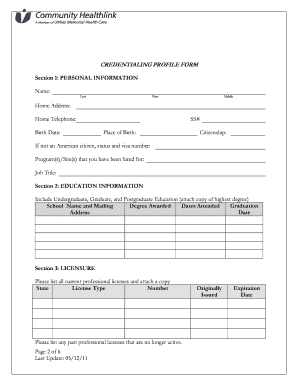
- Begin with Section 1: Personal Information. Fill in your last name, first name, and middle name. Enter your home address, home telephone number, birth date, Social Security number, place of birth, and citizenship status. If you are not an American citizen, provide your status and visa number. Specify the programs or sites you have been hired for, as well as your job title.
- Move to Section 2: Education Information. List your educational background, including undergraduate, graduate, and postgraduate education. Attach a copy of your highest degree.
- Continue to Section 3: Licensure. List all current professional licenses with the state, license type, and number. Include any past licenses that are no longer active, noting their original issue and expiration dates.
- If applicable, complete Section 4: Admitting Privileges. List the hospitals or health care facilities where you have admitting privileges, along with their mailing addresses and contact information.
- In Section 5: Registrations and Certifications, indicate any relevant registrations or certifications you hold and attach copies of these documents.
- Proceed to Section 6: Paneling/Credentialing. List any Managed Care panels you have served on and submit any applications or letters of acceptance associated with these panels.
- In Section 7: Languages Spoken, indicate the languages you speak and your degree of proficiency. Include whether you have provided treatment in each language.
- Answer the questions in Section 8: Questionnaire truthfully. If you answer ‘yes’ to any questions, provide an explanation as needed. This section concerns your professional conduct and any actions against your licenses.
- Complete Section IX: Professional Training Attendance by noting any relevant certification and trainings you have attended, such as CPR or First Aid.
- Fill out Section X: Specialties, choosing any applicable specialty areas from the provided list.
- Finally, sign in Section XI: Verification, confirming that all information is accurate and complete. Include the date of your signature.
- After completing the form, you can save changes, download a copy, print it, or share the form as needed.
Complete your MA Community Healthlink Credentialing Profile Form online to ensure an efficient credentialing process.