N Portal (EVP) Access Form to be processed. This administrator will reset the passwords on the EVP. Individual user passwords will be emailed to the administrator who will then forward the email to the appropriate user. It is the administrator s responsibility to reset the password if an employee leaves, thereby removing access to the EVP for that user. This EVP Access Form is required to add new users. Passwords Xerox will assign a User ID and temporary password by email. The user will be pr.
Loading

Open form follow the instructions

Easily sign the form with your finger

Send filled & signed form or save
How to fill out the TX HHS Form 1317 online
This guide provides clear, step-by-step instructions for filling out the TX HHS Form 1317 online. Whether you are a first-time user or familiar with the process, this resource aims to ensure you complete the form accurately and efficiently.
Follow the steps to successfully complete the form online.
- Click the ‘Get Form’ button to access the TX HHS Form 1317 and open it in your chosen editor.
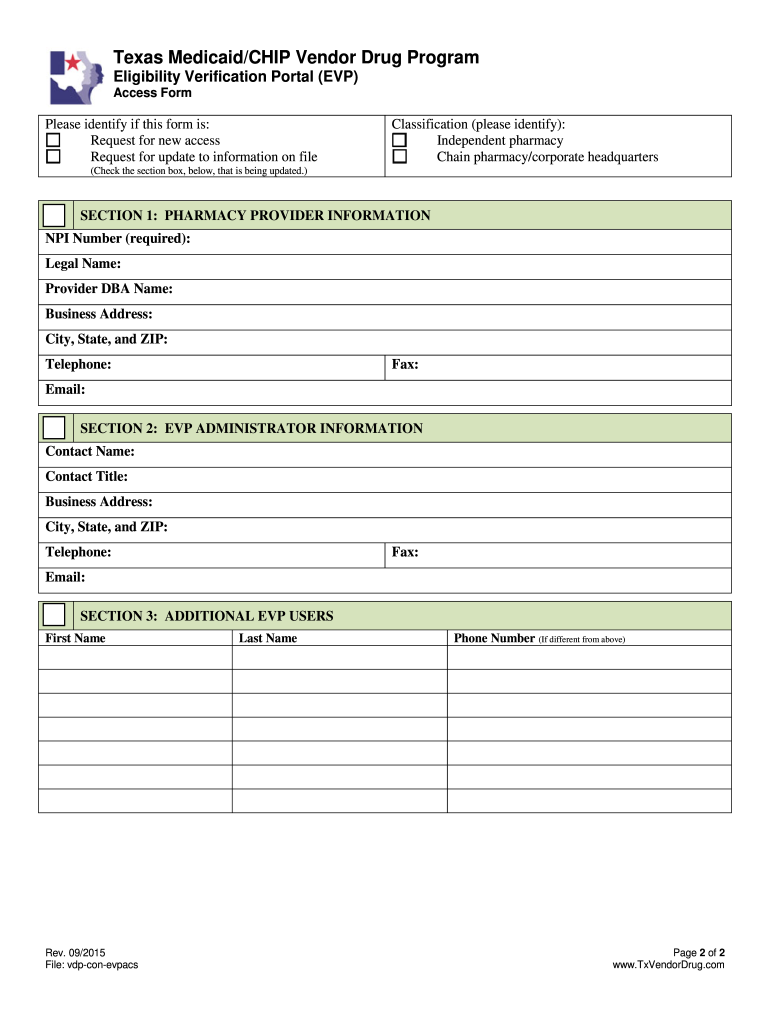
- Identify the purpose of your submission by selecting either 'Request for new access' or 'Request for update to information on file'. Make sure to check the appropriate section box.
- In Section 1, provide all required pharmacy provider information, including the NPI Number, Legal Name, Provider DBA Name, Business Address, City, State, ZIP Code, Telephone, Fax, and Email.
- Move to Section 2 and fill in the EVP administrator information. This includes the Contact Name, Contact Title, Business Address, City, State, ZIP Code, Telephone, Fax, and Email.
- Proceed to Section 3 to add additional EVP users. Enter the First Name, Last Name, and Phone Number for each new user.
- Review all entries for accuracy. Once completed, you can choose to save changes, download, print, or share the form as needed.
Complete your TX HHS Form 1317 online today to ensure your eligibility verification process is smooth and efficient.
Experience a faster way to fill out and sign forms on the web. Access the most extensive library of templates available.
Related content
EVP is a browser-based application used to obtain a person's enrollment status, pharmacy...
Application of governmental health care guidelines. Includes specimen collection and ... A...
The provider must also submit the DH Form 3134 to the County Health Department (CHD) in...
Use professional pre-built templates to fill in and sign documents online faster. Get access to thousands of forms.
If you believe that this page should be taken down, please follow our DMCA take down process here.