Loading
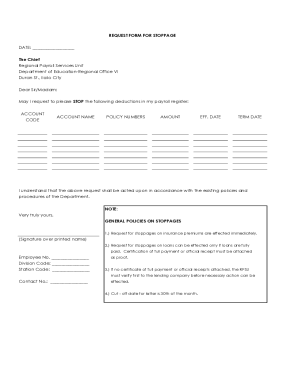
Get Ph Request Form For Stoppages - Iloilo City 2021-2026
How it works
-

Open form follow the instructions
-

Easily sign the form with your finger
-

Send filled & signed form or save
How to fill out the PH Request Form For Stoppages - Iloilo City online
This guide provides step-by-step instructions for completing the PH Request Form For Stoppages - Iloilo City online. By following these instructions, users can easily navigate through the form to ensure accurate submission of their request to stop payroll deductions.
Follow the steps to fill out the form accurately and efficiently.
- Press the ‘Get Form’ button to obtain the PH Request Form For Stoppages and open the form in your preferred digital environment.
- Begin by filling in the date at the top of the form, which indicates when you are submitting the request.
- Address the form to 'The Chief, Regional Payroll Services Unit, Department of Education-Regional Office VI, Duran St., Iloilo City'.
- In the body of the form, clearly state your request by writing 'May I request to please STOP the following deductions in my payroll register:'.
- Complete the table by detailing the following fields for each deduction you wish to stop: 'Account Code', 'Account Name', 'Policy Numbers', 'Amount', 'Effective Date', and 'Term Date'.
- Include your Employee Number, Division Code, and Station Code towards the end of the form to identify your account.
- Provide your contact number for follow-up communications.
- At the bottom, sign above your printed name to formally submit the request.
- Review all information for accuracy; ensure that any required attachments such as proof of payment for loans are included.
- Once you have filled out the form completely, you may save the changes, download, print, or share the form as needed.
Take control of your payroll deductions by completing your request form online today!