Loading
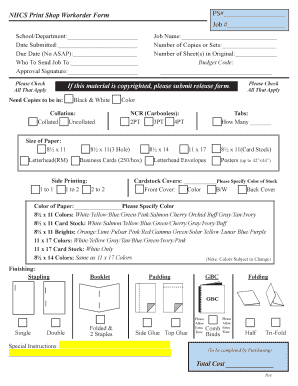
Get Nhcs Print Shop Workorder Form 2014
How it works
-

Open form follow the instructions
-

Easily sign the form with your finger
-

Send filled & signed form or save
How to fill out the NHCS Print Shop Workorder Form online
Filling out the NHCS Print Shop Workorder Form online can streamline the print request process for schools and departments. This comprehensive guide will help you navigate through each section of the form with clarity and support.
Follow the steps to fill out the NHCS Print Shop Workorder Form accurately.
- Press the ‘Get Form’ button to access the form and open it in the online editor.
- Enter the job number in the designated field. This is necessary for tracking your print job.
- Input the school or department name to ensure the job is directed to the correct location.
- Fill in the date when you are submitting the form, which helps in managing timelines.
- Specify the due date for the print job, remembering to avoid requests marked 'ASAP'.
- Indicate the name of the person who will receive the completed job in the 'Who to Send Job To' section.
- Obtain and input the approval signature, as required, to validate the work order.
- Check all applicable job specifications, including the job name and the number of copies or sets needed.
- Indicate the number of sheets in the original document for accurate duplication.
- Input the budget code to allocate costs properly, ensuring departmental billing is correct.
- If the material is copyrighted, remember to submit the appropriate release form.
- Select whether copies should be in black and white or color, ensuring electronic submissions for color jobs.
- Choose collated or uncollated options based on your needs.
- Specify the number of tabs if required.
- Select the NCR (Carbonless) type you need—2PT, 3PT, or 4PT.
- Indicate the size of the paper required, selecting from the provided options.
- Determine if side printing is needed, selecting the appropriate options.
- Check any additional paper size options that may apply to your print job.
- Specify any color preferences for cardstock covers, front, and back covers.
- Determine the color of the paper needed based on available options.
- Select finishing options such as stapling or padding, and note that special instructions can be added as needed.
- Choose your sending instructions based on your preferred method—email, print and send, or fax.
- Make sure to note any extra time needed for specific requests, such as comb binds or folding.
- Once all fields are completed, save changes and choose to download, print, or share the form as required.
Complete your NHCS Print Shop Workorder Form online today to ensure efficient processing of your print requests.
Get form
Experience a faster way to fill out and sign forms on the web. Access the most extensive library of templates available.
Noun. printing form (plural printing forms) An object, usually in the shape of a block or a plate, used in printing to apply ink on the printed surface.
Get This Form Now!
Use professional pre-built templates to fill in and sign documents online faster. Get access to thousands of forms.