Loading
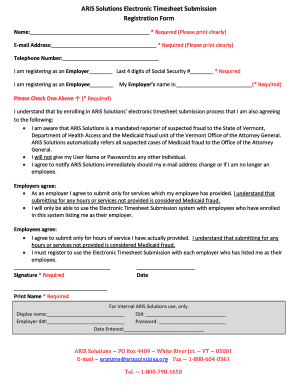
Get Aris Solutions Electronic Timesheet Submission Registration Form 2015-2026
How it works
-

Open form follow the instructions
-

Easily sign the form with your finger
-

Send filled & signed form or save
How to fill out the ARIS Solutions Electronic Timesheet Submission Registration Form online
The ARIS Solutions Electronic Timesheet Submission Registration Form is essential for employers and employees to register for submitting timesheets electronically. This guide will provide you with clear instructions on how to complete the form online efficiently.
Follow the steps to complete the registration form.
- Click the ‘Get Form’ button to access the ARIS Solutions Electronic Timesheet Submission Registration Form and open it in your preferred online editor.
- Begin filling out the required fields. Start with your name, ensuring it is printed clearly in the designated area. This information is crucial for identification.
- Provide your email address in the required field. It is important to print this clearly as it will be used for all communications regarding your registration.
- Enter your telephone number. While this field is not mandatory, it is recommended for additional communication if necessary.
- Select your registration status by marking either 'I am registering as an Employer' or 'I am registering as an Employee.' Ensure you complete the last four digits of your Social Security number if registering as an employer.
- Fill in your employer's name in the required field. This is necessary to link your registration to the correct employer.
- Acknowledge the agreement terms by reviewing the statements about fraud reporting and security of user credentials. Sign the form, print your name clearly, and date it.
- Once completed, the registration form must be mailed, faxed, or emailed to ARIS Solutions. Ensure the form is sent in a secure manner.
- After submission, await a confirmation email from ARIS Solutions, which will include your username, password, and an electronic timesheet handbook.
- Upon receiving confirmation, you may begin using the Electronic Timesheet system for submitting timesheets. Remember to submit new registration forms for each employer.
Complete the ARIS Solutions Electronic Timesheet Submission Registration Form online today to streamline your timesheet submissions.