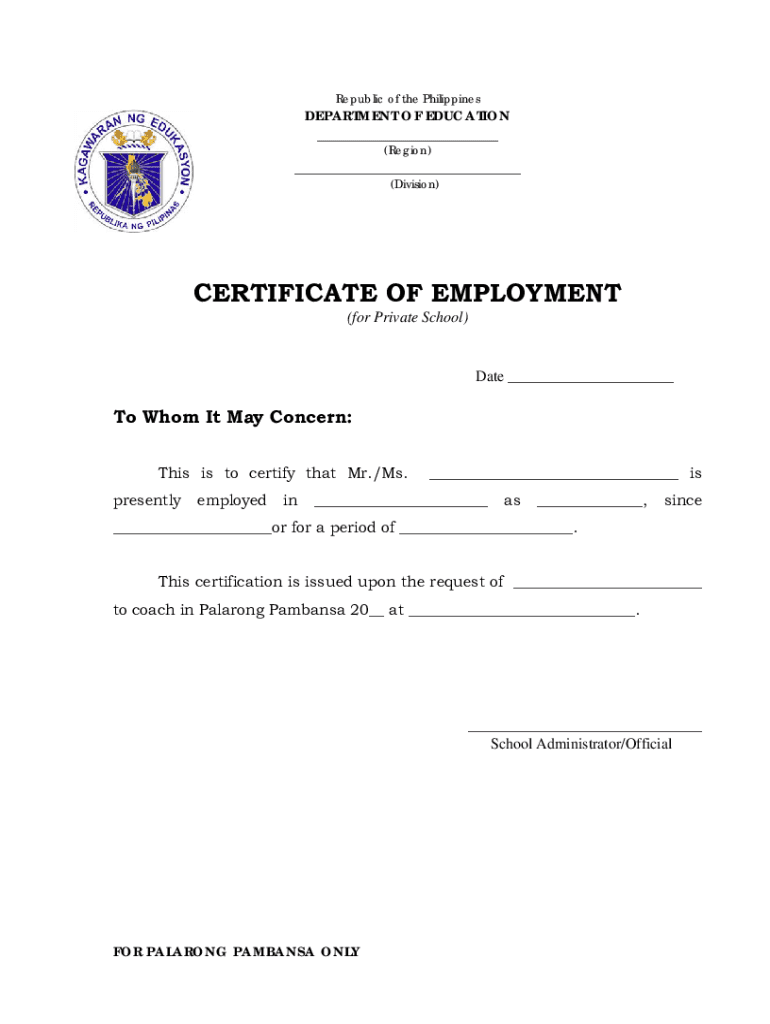
Republic of the PhilippinesDEPARTMENT OF EDUCATION (Region) (Division)CERTIFICATE OF EMPLOYMENT (for Private School)Date To Whom It May Concern: This is to certify that Mr./Ms. presentlyemployedin.

Open form follow the instructions

Easily sign the form with your finger

Send filled & signed form or save
How to fill out the CerificateOfEmployment PRIVATESCHOOL.doc online
This guide provides clear instructions on how to effectively fill out the Certificate of Employment for Private School online. Whether you are a school administrator or a human resources officer, this step-by-step approach will help you complete the form accurately and efficiently.
Follow the steps to complete the form online successfully.
- Click the ‘Get Form’ button to access the form and open it in your editing application.
- Fill in the date at the top of the document to indicate when the certificate is being issued.
- In the 'To Whom It May Concern' section, write a brief greeting or introduction as needed.
- Enter the name of the person employed (Mr./Ms.) into the designated space.
- Specify the current employment status by filling in the section that indicates the position of the employee.
- Provide the name of the school where the individual is employed in the appropriate field.
- Fill in the specific role or designation of the employee for clarity.
- Indicate the start date of employment in the corresponding field.
- Document the total duration of employment, ensuring the information is accurate.
- Note that this certification is issued upon the request of a specific person by filling their name in the requested area.
- Clarify the purpose of the certificate, which is to coach in Palarong Pambansa, and make sure to specify the year and location.
- Conclude by adding the name and title of the school administrator or official signing the document.
- Once you have filled out all the necessary fields, remember to save your changes, download the document, print it, or share it as needed.
Complete your documents online with ease and ensure your forms are ready for use!
Experience a faster way to fill out and sign forms on the web. Access the most extensive library of templates available.
Related content
Working papers are also known as Employment Certification. All students between 14 - 17...
List A. Documents that Establish Both Identity and Employment Eligibility. U.S. Passport...
If you have a Board. Certification, click the radio button for “I have Board...
Get answers to your most pressing questions about US Legal Forms API.
What is an employment letter?
It states that you currently work for the company and includes details such as your job title, how long you've worked there, whether you work part- or full-time, your wage or salary, and your employer's contact information. Letters of employment are usually brief as they just need to verify your income and position.
What is a proof of employment?
Employment verification letter: An employment verification letter is one of the most common proofs of employment. This letter should state who your employer is, your title, the length of your employment and your annual salary and bonus opportunities. Ideally, it's signed by your boss or an HR representative.
What is the format of salary certificate?
Salary Certificate Format – Example 2: This is to certify that Mr. /Ms. [Employee Name]_____ Employee ID [Number], [Identification Number] is working', with [Company Name] _since [Date, Month & Year of Joining] _She/he is a Permanent employee of the company and is serving as [Designation] in the [Department Name].
What is the content of certificate of employment?
Simply put, it is a document that details an employee's working history within your company. The COE contains their personal information, the period of rendered service, and the termination date (if ever). The purpose of a COE is to verify whether a person worked in your company or not.
How to make a request letter for a certificate of employment?
A standard request letter for a certificate of employment typically includes the following details: name and address of the organisation or individual requesting verification. name of employee and job title. reason for the request. list of information requested. preferred mode of receipt. deadline for request.
What is a certification of employment?
Employment Certification is the process by which employers provide detailed appointment and payroll data to be used during the review of Service Credit Purchase requests and membership reviews for potential arrears. The process to submit an employment certification is completed electronically through myCalPERS.
Use professional pre-built templates to fill in and sign documents online faster. Get access to thousands of forms.
If you believe that this page should be taken down, please follow our DMCA take down process here.