Loading
Get Canada Liuna Local 183 Bereavement/parental Leave 2021-2025
How it works
-

Open form follow the instructions
-

Easily sign the form with your finger
-

Send filled & signed form or save
How to fill out the Canada Liuna Local 183 Bereavement/Parental Leave online
Filling out the Canada Liuna Local 183 Bereavement/Parental Leave form online provides a straightforward way to request your benefits during a difficult time. This guide offers a detailed walkthrough of each section of the form to ensure you complete it accurately and efficiently.
Follow the steps to complete the form with ease.
- To begin, click the ‘Get Form’ button to access the Bereavement/Parental Leave form and open it in your preferred editing tool.
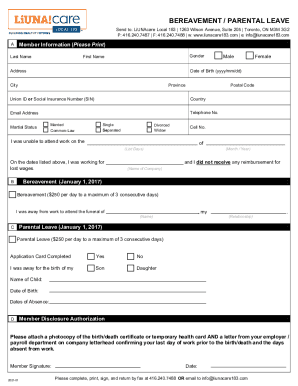
- Provide your personal information in the 'Member Information' section. Clearly print your last name, first name, date of birth (formatted as yyyy/mm/dd), address, city, province, postal code, country, email address, and telephone number. Ensure your Union ID or Social Insurance Number is accurately recorded.
- Indicate your marital status by selecting the appropriate option, such as single, married, divorced, separated, widow, or common-law. Include your cell number in the designated field.
- In the 'I was unable to attend work' section, clearly state the dates you were absent from work, detailing the month and year. Include the name of the company you worked for during this period and specify any lost wages you experienced.
- If applying for bereavement leave, note the name of the deceased and your relationship to them in the provided fields. Remember, you are entitled to $250 per day for a maximum of three consecutive days.
- For parental leave requests, fill out the relevant fields indicating the child's name, date of birth, and the dates of your absence. Similar to bereavement leave, you may receive $250 per day for a maximum of three consecutive days.
- Complete the 'Member Disclosure Authorization' section by attaching a photocopy of the appropriate documents, such as a birth or death certificate or temporary health card. Also, include a letter from your employer confirming your last working day and the days you were absent.
- Lastly, ensure you sign and date the form. Once everything is filled out, you can save your changes, download a copy, or print the completed form. Send it via fax to 416.240.7488 or email it to info@liunacare183.com.
Ensure you complete and submit your application online to access your bereavement or parental leave benefits promptly.
Reasons bereavement leave may be taken spouse (includes both married and unmarried couples, of the same or opposite genders) parent, step-parent, foster parent, child, step-child, foster child, grandparent, step-grandparent, grandchild or step-grandchild of the employee or the employee's spouse.
Industry-leading security and compliance
US Legal Forms protects your data by complying with industry-specific security standards.
-
In businnes since 199725+ years providing professional legal documents.
-
Accredited businessGuarantees that a business meets BBB accreditation standards in the US and Canada.
-
Secured by BraintreeValidated Level 1 PCI DSS compliant payment gateway that accepts most major credit and debit card brands from across the globe.