Loading
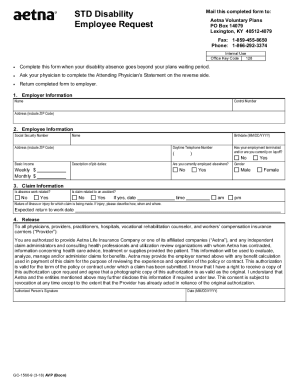
Get Aetna Gc-1560-4 2018-2026
How it works
-

Open form follow the instructions
-

Easily sign the form with your finger
-

Send filled & signed form or save
How to fill out the Aetna GC-1560-4 online
Filling out the Aetna GC-1560-4 form online can be a straightforward process when you know what to do. This guide provides clear instructions to help you navigate each section effectively.
Follow the steps to complete your Aetna GC-1560-4 form online.
- Click ‘Get Form’ button to obtain the form and open it in the online editor.
- In the first section titled 'Employer Information', fill in the employer's name, control number, and complete address including the ZIP code.
- Proceed to 'Employee Information'. Provide your Social Security number, full name, birthdate using the format MM/DD/YYYY, and your complete address including the ZIP code. Indicate whether your employment has terminated or if you are currently on layoff, and provide a daytime telephone number.
- In 'Claim Information', state if your absence is work-related. Indicate whether the claim relates to an accident, and if so, provide the date and time of the incident. Describe the nature of the illness or injury, including how, when, and where it occurred. Also, state your expected return to work date.
- Under the 'Release' section, authorize disclosure of your information by signing and dating the authorization. Ensure to include all necessary information as prompted.
- Read through the 'Misrepresentation' statement, then sign and date at the bottom of the section as acknowledgment of understanding.
- Have your physician complete the 'Attending Physician’s Statement' section if applicable. Ensure they provide the necessary details regarding your condition, including diagnosis and any limitations.
- After filling out all sections, review your information for accuracy. Save any changes made, then download, print, or share the completed form as necessary.
Complete your Aetna GC-1560-4 form online now!
Hartford, CT Aetna / Headquarters