Loading
Get Aetna Gc-1560-4 2018-2026
How it works
-

Open form follow the instructions
-

Easily sign the form with your finger
-

Send filled & signed form or save
How to fill out the Aetna GC-1560-4 online
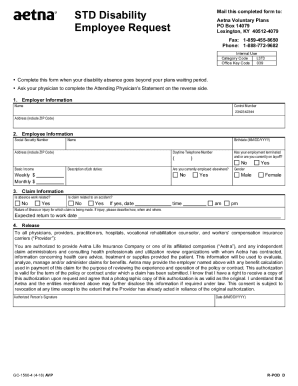
Completing the Aetna GC-1560-4 form online is essential for employees requesting benefits due to a disability absence. This guide provides clear, step-by-step instructions to help users fill out the form accurately and efficiently.
Follow the steps to successfully complete the Aetna GC-1560-4 form online.
- Click the ‘Get Form’ button to obtain the form and open it in the online editor.
- In the Employer Information section, enter your employer's name, control number, and address including ZIP code.
- In the Employee Information section, fill in your Social Security number, name, birthdate, and daytime telephone number. Provide your address and describe your job duties.
- Indicate if your employment has terminated, if you are on layoff, or if you are presently employed elsewhere. Specify your basic income in the weekly or monthly fields.
- In the Claim Information section, answer whether your absence is work-related or related to an accident. Provide the date and time of the incident if applicable, and describe the nature of your illness or injury.
- Enter your expected return to work date.
- In the Release section, sign and date the form to authorize information release to Aetna and relevant parties.
- Complete the Misrepresentation section by reading and understanding the penalties for providing false information.
- If necessary, move to the Attending Physician’s Statement section, where your physician will need to fill out information about your illness or injury.
- Review all provided information for accuracy, then save your changes, download the form, or print a copy for your records.
Complete your Aetna GC-1560-4 form online today to ensure a smooth processing of your disability claim.
Electronic claims submission Use Payer ID# 128CA when submitting claims to Aetna Better Page 2 Health of California.