Loading
Form preview
  • US Legal Forms
  • Form Library
  • More Forms
  • More Multi-State Forms
  • Canada Hce0001 - Alberta 2022

Get Canada Hce0001 - Alberta 2022-2026

How it works

  1. Open form

    Open form follow the instructions

  2. Easily sign form

    Easily sign the form with your finger

  3. Share form

    Send filled & signed form or save

How to fill out the Canada HCE0001 - Alberta online

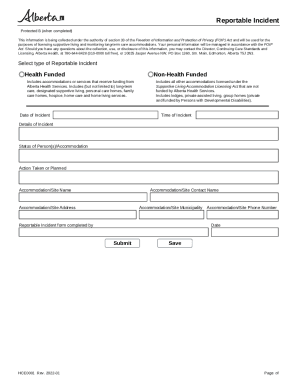
Filling out the Canada HCE0001 form is an essential step for reporting incidents in supportive living and long-term care accommodations in Alberta. This guide provides you with the necessary steps to complete the form efficiently and accurately.

Follow the steps to successfully complete the form.

  1. Click ‘Get Form’ button to obtain the form and open it in the editor.
  2. Select the type of reportable incident by choosing either 'Health Funded' or 'Non-Health Funded'. Ensure that you understand which category applies to the incident you are reporting.
  3. Enter the date of the incident. This should reflect the actual date when the incident occurred.
  4. Provide the time of the incident. Make sure to specify whether it was during the day or night to give clarity on the situation.
  5. Detail the incident in the 'Details of Incident' section. Be thorough and factual in your description to ensure accurate reporting.
  6. Include the status of the person(s) involved or the accommodation. This helps in assessing the situation accurately.
  7. Outline any action taken or planned following the incident. This could include immediate responses or longer-term follow-up measures.
  8. Fill in the accommodation/site name where the incident occurred. This helps in identifying the specific location.
  9. Provide the accommodation/site contact name. This person should be able to answer any follow-up questions regarding the incident.
  10. Enter the accommodation/site address accurately to avoid any miscommunication.
  11. Specify the accommodation/site municipality where the incident took place.
  12. Complete the 'Reportable Incident form completed by' section with your name and title.
  13. Enter the date when the form was completed.
  14. Save your changes. You can download, print, or share the form once completed.

Take the next step towards effective incident reporting by completing your Canada HCE0001 form online.

Get form

Experience a faster way to fill out and sign forms on the web. Access the most extensive library of templates available.
Get form

Related content

(PDF) Fungal Planet description sheets: 69–91 |...
Canada, Alberta, Edmonton, Lamont, alt. c. 664 m, from roots of 92 apparently healthy...
Learn more

Related links form

WI DT2005 2003 NY DOH-4220I ES 2023 IT Politecnico Di Milano Consolidated Document On Interference Risk Assessment And Prevention 2017 ES Solicitud De Visado Nacional 2024

Questions & Answers

Get answers to your most pressing questions about US Legal Forms API.

Contact support

Reportable Incidents and Examples Fraud. Fraud involves an intentional deception or misrepresentation, by act or omission, which results or could result in a benefit for a person or entity to which the person or entity is not entitled. Waste. ... Inefficiency. ... Abuse.

Notice Requirements for Reporting Workplace Incidents Results in death. Results in a worker being admitted to the hospital. Results in an unplanned or uncontrolled explosion, fire or flood; causing or potentially causing serious injury. Results in the collapse or upset of a crane, derrick or hoist.

From near hits to lost time accidents, here are the most common types of incidents that occur in the workplace and require a report. Near Miss. ... Unsafe Acts. ... Workplace Hazards. ... Minor Injury. ... Lost Time Accident. ... Security Incident. ... Fire Incident. ... Fatalities.

Accidents outside of work are not reportable. For example, if a worker was injured at home and the injury resulted in over 7 days off work, it wouldn't be RIDDOR reportable because it didn't happen at work.

The Incident Report form must be completed and submitted to your local Children's Services' licensing office within two days of the incident. Early Learning and Child Care Regulation Exemption Request – Use this form for facility-based program and family day home agency exemption requests.

Any work-related injury or illness that results in loss of consciousness, days away from work, restricted work, or transfer to another job. Any work-related injury or illness requiring medical treatment beyond first aid.

Reportable incidents are so named, because they must be reported directly to OSHA within 8 – 24 hours depending on the occurrence. Reportable incidents are always severe in nature and include amputations, loss of an eye, in-patient hospitalization (admittance), and fatalities.

Reportable incidents are serious incidents or alleged incidents which result in harm to an NDIS participant and occur in connection with NDIS supports and services.

Get This Form Now!

Use professional pre-built templates to fill in and sign documents online faster. Get access to thousands of forms.
Get form
If you believe that this page should be taken down, please follow our DMCA take down processhere.
Get Canada HCE0001 - Alberta
Get form
  • Adoption
  • Bankruptcy
  • Contractors
  • Divorce
  • Home Sales
  • Employment
  • Identity Theft
  • Incorporation
  • Landlord Tenant
  • Living Trust
  • Name Change
  • Personal Planning
  • Small Business
  • Wills & Estates
  • Packages A-Z
  • Affidavits
  • Bankruptcy
  • Bill of Sale
  • Corporate - LLC
  • Divorce
  • Employment
  • Identity Theft
  • Internet Technology
  • Landlord Tenant
  • Living Wills
  • Name Change
  • Power of Attorney
  • Real Estate
  • Small Estates
  • Wills
  • All Forms
  • Forms A-Z
  • Form Library
  • Legal Hub
  • About Us
  • Help Portal
  • Legal Resources
  • Blog
  • Affiliates
  • Contact Us
  • Delete My Account
  • Site Map
  • Industries
  • Forms in Spanish
  • Localized Forms
  • State-specific Forms
  • Forms Kit
  • Real Estate Handbook
  • All Guides
  • Notarize
  • Incorporation services
  • For Consumers
  • For Small Business
  • For Attorneys
  • USLegal
  • FormsPass
  • pdfFiller
  • signNow
  • altaFlow
  • DocHub
  • Instapage
Form Packages
  • Adoption
  • Bankruptcy
  • Contractors
  • Divorce
  • Home Sales
  • Employment
  • Identity Theft
  • Incorporation
  • Landlord Tenant
  • Living Trust
  • Name Change
  • Personal Planning
  • Small Business
  • Wills & Estates
  • Packages A-Z
Form Categories
  • Affidavits
  • Bankruptcy
  • Bill of Sale
  • Corporate - LLC
  • Divorce
  • Employment
  • Identity Theft
  • Internet Technology
  • Landlord Tenant
  • Living Wills
  • Name Change
  • Power of Attorney
  • Real Estate
  • Small Estates
  • Wills
  • All Forms
  • Forms A-Z
  • Form Library
Customer Service
  • Legal Hub
  • About Us
  • Help Portal
  • Legal Resources
  • Blog
  • Affiliates
  • Contact Us
  • Delete My Account
  • Site Map
  • Industries
  • Forms in Spanish
  • Localized Forms
  • State-specific Forms
  • Forms Kit
Legal Guides
  • Real Estate Handbook
  • All Guides
Prepared for you
  • Notarize
  • Incorporation services
Our Customers
  • For Consumers
  • For Small Business
  • For Attorneys
Our Sites
  • USLegal
  • FormsPass
  • pdfFiller
  • signNow
  • altaFlow
  • DocHub
  • Instapage
Social Media
Call us now toll free:
+1 833 426 79 33
As seen in:
© Copyright 1999-2026 airSlate Legal Forms, Inc. 3720 Flowood Dr, Flowood, Mississippi 39232
  • Your Privacy Choices
  • Terms of Service
  • Privacy Notice
  • Content Takedown Policy
  • Bug Bounty Program