Loading
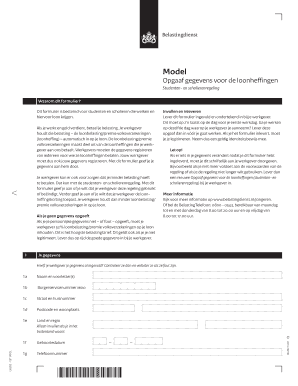
Get Nl Belastingdienst Lh 202 2014
How it works
-

Open form follow the instructions
-

Easily sign the form with your finger
-

Send filled & signed form or save
How to fill out the NL Belastingdienst LH 202 online
The NL Belastingdienst LH 202 form is essential for students and school pupils who earn income and need to register their personal details to receive appropriate tax adjustments. This guide provides a clear, step-by-step approach to completing the form online, ensuring you understand each section and its requirements.
Follow the steps to complete your NL Belastingdienst LH 202 form online.
- Click ‘Get Form’ button to obtain the NL Belastingdienst LH 202 and open it in your editing tool.
- Begin with your personal details in section 1: enter your first name and initials in field 1a, your citizen service number (BSN) in field 1b, and your address information including street, house number, postal code, and city in fields 1c to 1d. If you reside outside the Netherlands, complete field 1e with your country and region.
- Continue by filling in your birth date in field 1f and your contact number in field 1g. If your employer has already filled in some details, ensure to review and correct any inaccuracies.
- Move to section 2, titled 'Gegevens studenten- en scholierenregeling'. Here, indicate whether you want to start or end the student and pupil arrangement in field 2a.
- If starting the arrangement, specify the date in field 2b, typically your first workday. Choose your applicable situation in field 2c, checking the proper options based on your circumstances.
- If you intend to end the arrangement, complete field 2d with the date that should apply, which can only align with a quarterly start.
- In section 3, respond to the question of whether you want your employer to apply the tax credit (loonheffingskorting). Indicate your preference by entering the required dates.
- After filling out the form, write the date and sign within the signature box. Ensure all data is accurate before submission.
- Submit the completed form to your employer before your first workday, ensuring you have valid identification for verification.
- Lastly, after submission, if any personal details change, notify your employer in writing with an updated form.
Complete your NL Belastingdienst LH 202 form online today to ensure accurate tax processing!
Get form
Experience a faster way to fill out and sign forms on the web. Access the most extensive library of templates available.
Get This Form Now!
Use professional pre-built templates to fill in and sign documents online faster. Get access to thousands of forms.