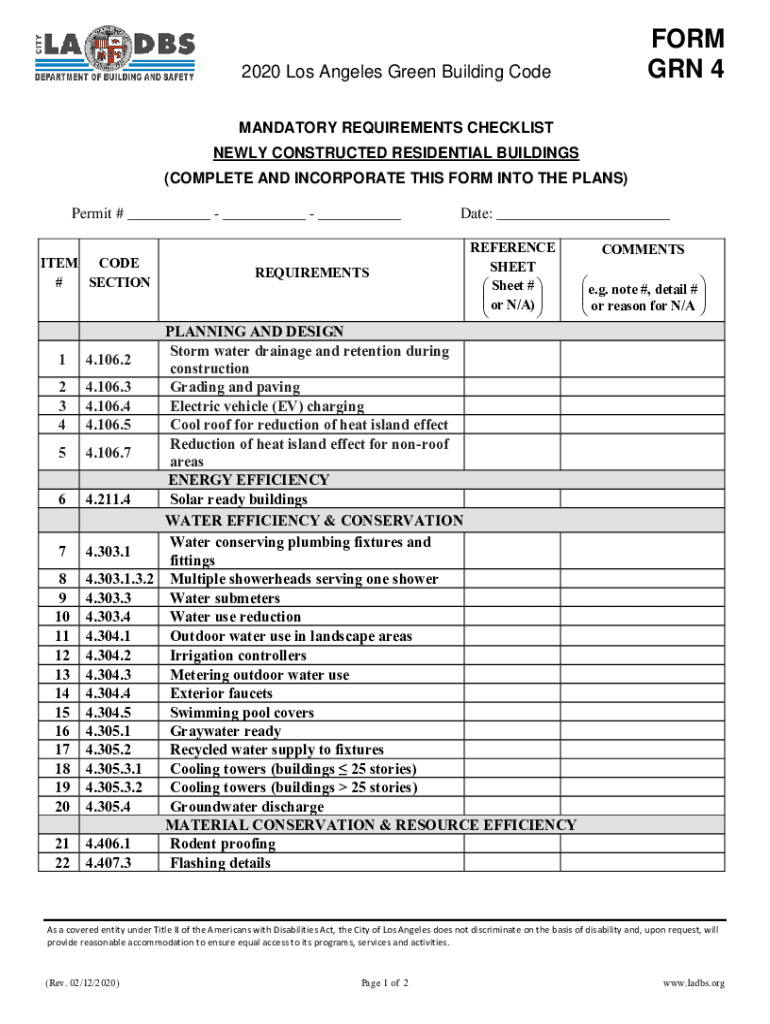
ITEM CODE # SECTION REQUIREMENTS Date: REFERENCE SHEET Sheet # or N/A) 1 2 3 4 5 6 7 8 9 10 11 12 13 14 15 16 17 18 19 20 21 22 COMMENTS e.g. note #, detail # or reason for N/A PLANNING AND DESIGN Storm water drainage and retention during 4.106.2 construction 4.106.3 Grading and paving 4.106.4 Electric vehicle (EV) charging 4.106.5 Cool roof for reduction of heat island effect Reduction of heat isl.

Open form follow the instructions

Easily sign the form with your finger

Send filled & signed form or save
How to use or fill out the Or N/A) online
This guide offers clear instructions on how to effectively complete the Or N/A) form required for newly constructed residential buildings in accordance with the Los Angeles Green Building Code. Whether you are familiar with digital forms or new to the process, our step-by-step instructions will help you ensure all necessary information is accurately provided.
Follow the steps to fill out the Or N/A) form with ease.
- Press the ‘Get Form’ button to access the Or N/A) form and open it in your desired application.
- Begin by entering the permit number in the specified fields. This number usually consists of three segments that you need to fill. Ensure accuracy as this number is critical for tracking your submission.
- Indicate the date of form completion in the designated 'Date' field. This should reflect the day you are filling out the form.
- For each item listed, review the requirements within the associated sections. Fill in the 'Reference Sheet' and 'Comments' fields with relevant details, noting any specific codes where applicable.
- If a particular requirement does not apply, indicate this by writing 'N/A' in the comments section alongside the respective item. Provide a brief explanation as needed.
- Double-check all entries for accuracy and completeness to ensure compliance with the given requirements.
- Once you have completed all sections of the form, you can save your changes. Options to download, print, or share the form may be available depending on the platform you are using.
Complete your forms online today to ensure compliance with the Green Building Code.
Experience a faster way to fill out and sign forms on the web. Access the most extensive library of templates available.
Related content
n. number of participants in a group. N. total number of participants. n/a or NA. not...
May 17, 2023 — #N/A Authorization - The #N/A Authorization error occurs because you or...
Term coupling supervision. Acronym n/a. Category application. Application RMD. Definition...
Get answers to your most pressing questions about US Legal Forms API.
Is there a slash in na?
It's nonsense relic from an old day, NA should be used even though Meriam Webster says N/A is correct. The logic was they were afraid na would be misread as no to often, which in itself is a silly jusifications today because we capitalize abbreviations.
What is the short form for unknown?
There is one common way to abbreviate unknown: unk. For example: ''Origin unk. ''
What does NA mean in a project?
written abbreviation for not applicable: used on a form when you cannot give a relevant (= that answers the question) answer to a question.
What is the correct way to write na?
ing to the associated press, the only correct and acceptable abbreviation for "not applicable" is, in fact, NA.
What does n slash a mean?
written abbreviation for not applicable: used on a form to show that you are not giving the information asked for because the question is not intended for you or your situation: If a question does not apply to you, please put N/A in the box provided.
How do you use a slash in an abbreviation?
Forward slashes can used in abbreviations such as "w/o" to shorten words like "without". Here are some other examples of using forward slashes in abbreviations: care of = c/o. air conditioning = a/c.
What's the meaning of Na?
NA is a written abbreviation for not applicable or not available.
Use professional pre-built templates to fill in and sign documents online faster. Get access to thousands of forms.
If you believe that this page should be taken down, please follow our DMCA take down process here.