Loading
Get La Ofs 4sr 2023-2026
How it works
-

Open form follow the instructions
-

Easily sign the form with your finger
-

Send filled & signed form or save
How to fill out the LA OFS 4SR online
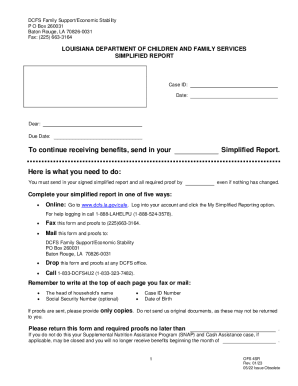
The LA OFS 4SR form is essential for individuals receiving benefits from the Louisiana Department of Children and Family Services. This guide will walk you through the process of accurately completing this online form to ensure continued assistance.
Follow the steps to effectively complete the LA OFS 4SR online.
- Click the ‘Get Form’ button to access the LA OFS 4SR form and open it in your browser.
- Begin by reviewing the personal information sections. Ensure your Case ID and date are entered correctly.
- In Section 1, confirm your mailing and residential addresses. If there is any change, fill out your new address accurately.
- In Section 2, list all household members, including their names, dates of birth, and whether they are U.S. citizens.
- Section 3 requires details about your earned income. Indicate any changes in income or hours worked and attach relevant proof.
- In Section 4, provide information related to unearned income, such as pensions or support. Note any changes and attach supporting documentation.
- Complete Section 5 regarding any child support obligations and provide proof of changes if applicable.
- Section 6 relates to your household's total resources. Declare if your resources exceed the set limits.
- In Section 7, declare any lottery or gambling winnings if applicable.
- Section 8 requests Social Security numbers, while Section 9 provides information about non-applicant household members.
- In Section 10, review the penalty warnings and ensure to sign the form to certify accuracy.
- Finally, save your changes, and submit the form online as instructed, ensuring all supporting documentation is included.
Complete your LA OFS 4SR online today to continue receiving your benefits.
Log into your CAFÉ portal account at .dcfs.la.gov/cafe. Click on “Check My Cases.” Select your Program (i.e., SNAP, CSE, FITAP) Under case details, click on “+ Upload.”.