Loading
Get Ny Teamsters Local 804 Grievance Form 2013-2026
How it works
-

Open form follow the instructions
-

Easily sign the form with your finger
-

Send filled & signed form or save
How to fill out the NY Teamsters Local 804 Grievance Form online
This guide provides step-by-step instructions for filling out the NY Teamsters Local 804 Grievance Form online. Following these instructions will help ensure that your grievance is submitted accurately and promptly.
Follow the steps to complete the grievance form effectively.
- Click the ‘Get Form’ button to obtain the form and open it in the editor.
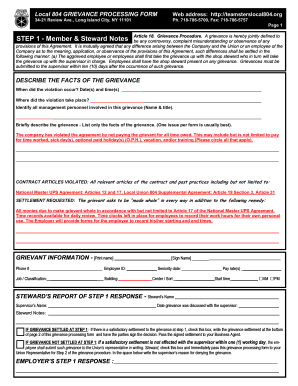
- Begin by filling out the member and steward notes section. Provide details about the grievance, including the date and time when the grievance occurred. Specify the location and identify any management personnel involved.
- In the grievance description, briefly summarize the facts of the grievance, focusing on one issue per form. Indicate if the company has violated the agreement and provide specifics, such as unpaid owed time.
- List the contract articles that are believed to have been violated. Refer to the National Master UPS Agreement and Local Union 804 Supplemental Agreement.
- Articulate the settlement requested by providing a detailed description of the desired resolution. This may include monetary compensation or changes in company practices.
- Complete the grievant information section, ensuring you provide your printed name, signature, contact information, employee ID, seniority date, pay rate, job classification, and other relevant details.
- In the steward's report of Step 1 response, document the name of the steward, the supervisor involved, and date the grievance was discussed. If settled, indicate this and write the settlement terms; if not settled, document the supervisor’s denial reason.
- For Step 2, if further action is necessary, the union officer should note the date the grievance was referred to management. Include the grievance number and the name and title of the manager receiving the written grievance.
- List all hearing dates with management and capture any notes regarding these meetings on a separate sheet and attach it to the form.
- In the Management Step 2 response section, note the response period and document the manager's decision. If the grievance is settled, clearly write the terms of the settlement and ensure all parties sign and date accordingly.
- Once all fields are completed, save changes to the document. You can download, print, or share the grievance form as needed.
Take action and complete your grievance form online today.
Return to Work/Reinstatement Form. If you are returning to work as a Teamster after submitting a withdrawal card, you must call Local 804 at 718-786-5700 or fill out this Return to Work Form.