Loading
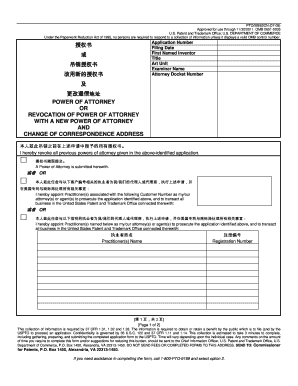
Get Pto/sb/82cn (07-09)
How it works
-

Open form follow the instructions
-

Easily sign the form with your finger
-

Send filled & signed form or save
How to fill out the PTO/SB/82CN (07-09) online
Filling out the PTO/SB/82CN (07-09) form is essential for managing powers of attorney and correspondence addresses in patent applications. This guide provides clear, comprehensive steps to ensure users can easily complete the form online.
Follow the steps to successfully complete the PTO/SB/82CN (07-09) form.
- Click the ‘Get Form’ button to obtain the PTO/SB/82CN (07-09) form and open it for editing.
- In the 'Application Number' field, enter the unique identifier for your patent application. This helps to associate the form with the correct application.
- Fill in the 'Filing Date' to indicate when the patent application was submitted. Accurate dating is crucial for legal documentation.
- Provide the name of the 'First Named Inventor.' This is the primary individual credited with the invention.
- In the 'Title' section, write a clear and descriptive title for the invention. This aids in the identification of the application.
- Enter the 'Art Unit' and 'Examiner Name' to specify the relevant division and the examiner assigned to your case.
- In the 'Attorney Docket Number' field, include any internal reference number your attorney uses to track the application.
- Specify the changes regarding the powers of attorney by indicating whether you are revoking a previous authorization or appointing a new practitioner.
- Complete the 'Practitioner(s) Name' and 'Registration Number' sections to identify the attorney(s) or agent(s) acting on your behalf.
- Provide your 'Telephone' and 'Email' for communication purposes. Ensure that the information is accurate to receive important updates.
- In the 'I am the:' section, identify your role by checking either 'Applicant/Inventor' or 'Assignee of record of the entire interest.'
- Sign the form under 'Signature of Applicant or Assignee of Record' and date it accurately to authenticate your submission.
- If multiple signatures are required, note the total number of forms submitted in the designated area before finalizing your document.
- Once you have completed all sections, you can save your changes, download, print, or share the form as needed.
Complete your PTO/SB/82CN (07-09) form online today to manage your patent application effectively.
Industry-leading security and compliance
US Legal Forms protects your data by complying with industry-specific security standards.
-
In businnes since 199725+ years providing professional legal documents.
-
Accredited businessGuarantees that a business meets BBB accreditation standards in the US and Canada.
-
Secured by BraintreeValidated Level 1 PCI DSS compliant payment gateway that accepts most major credit and debit card brands from across the globe.