Loading
Get Filling In A Fasset Mondetory Grant Form
How it works
-

Open form follow the instructions
-

Easily sign the form with your finger
-

Send filled & signed form or save
How to fill out the Filling In A Fasset Mandatory Grant Form online
This guide provides clear, step-by-step instructions to assist users in completing the Filling In A Fasset Mandatory Grant Form online. With straightforward guidance, users will navigate through the form confidently, ensuring all necessary information is accurately provided.
Follow the steps to effectively complete the form.
- Press the ‘Get Form’ button to access the form and open it for editing.
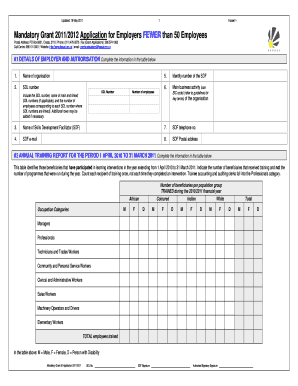
- Begin filling in Section A1, which requires details about the employer and authorisation. Include the name of the organisation, SDL number, details of the Skills Development Facilitator (SDF), and the number of employees. Add additional rows if necessary to include all relevant SDL numbers.
- Move on to A2. Here, fill out the Annual Training Report for the period 1 April 2010 to 31 March 2011. Input the number of beneficiaries that received training, categorized by population group and occupation categories.
- In section A3, outline the Workplace Skills Plan for the period 1 April 2011 to 31 March 2012. Specify the number of beneficiaries expected to receive training during this financial year, along with additional details as needed.
- Complete A4, where you will report the provincial and current employment profile as of 1 April 2011. Include the distribution of permanent staff by province and occupational group, ensuring to account for all types of staff as instructed.
- For section A5, list scarce skills for the period 2011/2012. Specify job specialization and occupational group while also indicating the learning mode and whether the intervention is NQF aligned.
- In A6, provide the required information for authorisation. Both the SDF and the authorised signatory must ensure that all details are correct and that they sign and date the application.
- Finally, review the entire form for completeness and accuracy. Once confirmed, you can save the changes to your document, download, print, or share the form as needed.
Complete your documents online to ensure a smooth submission process.
Related links form
Tenant Based Rental Assistance Policies And ... - City Of Vancouver
DPD Director's Rule 8-2007 - Landscape Standards - City Of Seattle - Seattle
DPD Director's Rule 5-2007 - Great Blue Heron Management Plan - Seattle
Descendants Of David "Lonesome Dave" Williams - West Virginia ... - Wvgenweb
The National Center for Family Philanthropy3 defines discretionary grants, more simply, as those made at the discretion of individual trustees or other authorized individuals, without the standard approval process and/or review by the full board.
Industry-leading security and compliance
US Legal Forms protects your data by complying with industry-specific security standards.
-
In businnes since 199725+ years providing professional legal documents.
-
Accredited businessGuarantees that a business meets BBB accreditation standards in the US and Canada.
-
Secured by BraintreeValidated Level 1 PCI DSS compliant payment gateway that accepts most major credit and debit card brands from across the globe.