Loading
Get Ny Midtel Cable Tv Application 2023-2026
How it works
-

Open form follow the instructions
-

Easily sign the form with your finger
-

Send filled & signed form or save
How to fill out the NY MIDTEL Cable TV Application online
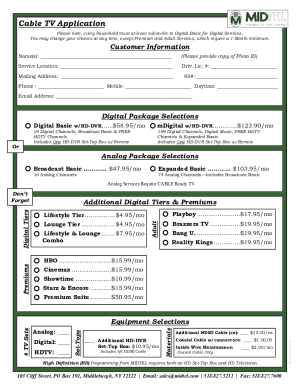
This guide provides a detailed overview of how to complete the NY MIDTEL Cable TV Application online. Ensuring that each section is accurately filled out will facilitate a smoother application process and help you choose the right services for your needs.
Follow the steps to successfully complete your application.
- Click the ‘Get Form’ button to access the application form and open it in the designated editor.
- Enter your customer information. This includes your name, service location, driver's license number, mailing address, social security number, phone numbers, and email address. Ensure all information is accurate and reflects your current details.
- Select your desired digital package from the options provided. Choose between 'Digital Basic w/HD-DVR' or 'mDigital w/HD-DVR' and proceed with your selection.
- If you are interested in the analog package selections, indicate your preference for either 'Broadcast Basic' or 'Expanded Basic' and ensure you understand that analog services require a CABLE ready television.
- Review additional digital tiers and premium services you may wish to include, such as lifestyle tiers or special programming packages. This section will detail the monthly fees associated with each choice.
- Complete the equipment selections section, where you will indicate any additional devices, such as extra set-top boxes, remotes, or cables you might need.
- Fill out the payment options, specifying if you prefer online payment or E-Z pay options. Input any necessary pre-payment information here.
- Provide any special instructions if applicable, and be sure to sign and date the application at the bottom of the form.
- After entering all necessary information, review the form carefully for accuracy before saving. Once satisfied, save your changes, download a copy, or print the form for your records.
Complete your NY MIDTEL Cable TV Application online today for a hassle-free setup!
Hulu + Live TV You also get cable channels such as A&E, BET, CN, CNN, Disney, Fox News, FX, HGTV, TBS, and TNT. The lineup includes CBS Sports, ESPN, and Fox Sports, plus some regional sports networks.