Loading
Get Dod Sample Statement Of Service 2016-2026
How it works
-

Open form follow the instructions
-

Easily sign the form with your finger
-

Send filled & signed form or save
How to fill out the DOD Sample Statement Of Service online
Filling out the DOD Sample Statement Of Service online is an essential step for military personnel and their families. This guide will provide clear, step-by-step instructions to ensure you complete the form accurately and efficiently.
Follow the steps to fill out the Statement Of Service correctly.
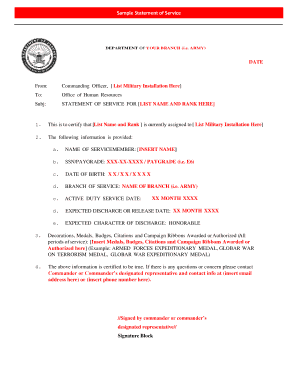
- Click ‘Get Form’ button to access the form and open it for editing.
- In the 'From' section, enter the name of the commanding officer and the military installation where they are assigned.
- In the 'To' section, provide the name of the Office of Human Resources.
- In the 'Subj' line, state ‘Statement of Service for [insert name and rank]’.
- In section 1, certify the current assignment by including the servicemember's name and rank alongside the military installation.
- In section 2, fill in each of the following details regarding the servicemember: their full name, Social Security Number and pay grade, date of birth, branch of service, active duty service date, expected discharge or release date, and expected character of discharge.
- In section 3, list any decorations, medals, badges, citations, or campaign ribbons awarded or authorized for the servicemember, including specific examples where relevant.
- In the final section, affirm the information's accuracy and include a point of contact for any questions, providing an email address and a phone number.
- Once all fields are accurately completed, users can save changes, download the document for printing, or share it as needed.
Complete your DOD Sample Statement Of Service online today to ensure accurate and timely documentation.
Download the DA Form 1506 from the official Army Publishing Directorate website or obtain a physical copy from your unit or organization.