Loading
Get Wi Ilife P-fs0019 2015-2026
How it works
-

Open form follow the instructions
-

Easily sign the form with your finger
-

Send filled & signed form or save
How to fill out the WI ILIFE P-FS0019 online
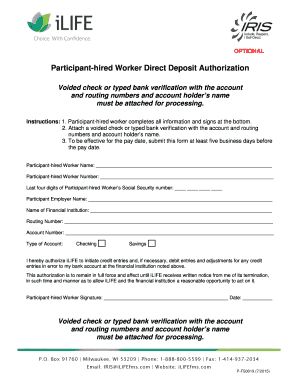
The WI ILIFE P-FS0019 is a direct deposit authorization form that allows participant-hired workers to conveniently manage their payments. This guide will walk you through the process of filling out this form online, ensuring you provide all necessary information accurately.
Follow the steps to complete your direct deposit authorization
- Click the ‘Get Form’ button to access the WI ILIFE P-FS0019 and open it in your editor.
- Begin filling out the form by entering your full name as the participant-hired worker in the provided field.
- Input your unique participant-hired worker number in the designated section.
- Provide the last four digits of your Social Security number in the specified field.
- Enter the name of your employer in the corresponding section.
- Indicate the financial institution where you wish your payments to be deposited by writing its name clearly.
- Fill in the routing number for your bank account, which is essential for direct deposits.
- Provide the account number associated with your bank account accurately.
- Select the type of account you are using for this direct deposit, either checking or savings.
- Review the authorization statement and check the box to agree, confirming that you allow iLIFE to process your deposits and necessary adjustments.
- Sign your name in the signature field provided on the form.
- Add the current date next to your signature.
- Ensure you attach a voided check or typed bank verification that includes your account and routing numbers, as well as your account holder’s name.
- Finally, review the entire form for accuracy before saving your changes, downloading, printing, or sharing it as needed.
Complete your WI ILIFE P-FS0019 form online to streamline your payment process.
IRIS is a self-directed program for Wisconsin's frail elders and adults with disabilities. IRIS stands for: Include, Respect, I Self-Direct. The IRIS program puts participants in control of their care. Participants manage their monthly budget, hire caregivers, and purchase approved goods and services.