1 ' " " 1 1 17554 & 8 )7&%9 + ) ) + . 0 !. - . ! ! 26" 6" # $ 6 . " ! . 0 ) % 5 ," + 2 $ +& D A F ; & 0 $ 6 ( 4 " $ A 5 A - 0 ' 0 A '% 42. $ % )' 4 A + ' % $ % ' ) ' " A A .A ! 5 -2 5 +( ## A D ) ! $ % )' ! / ! '% 42 . ' 9 0* 8 ' 6 & " # 9 5 5 ' 5 ' $ % * B & % & '! $ )5 ! )' ! " )" ## + 1 '' " . + " - & ! . & ' " '% 42" ' + 1 B4 )* 8 ' ('' 2 - 145. '% 42 ' ('' 1 $ % )' 4$ -.

How it works
  • Open form

    Open form follow the instructions

  • Easily sign form

    Easily sign the form with your finger

  • Share form

    Send filled & signed form or save

How to fill out the SG IRAS IR8A online

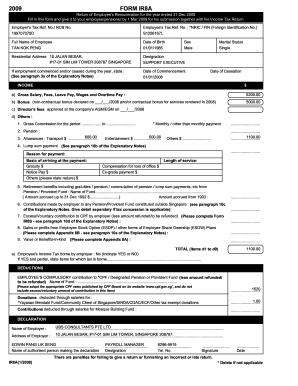
The SG IRAS IR8A is an essential document for reporting employment income. Completing this form online can streamline the process, ensuring accuracy and efficiency. This guide will provide you with step-by-step instructions to help you fill out the IR8A form accurately.

Follow the steps to complete the SG IRAS IR8A online

  1. Click the ‘Get Form’ button to obtain the form and open it in the designated editor.
  2. Review the form's introduction section, which outlines the purpose and importance of the IR8A form. Ensure that you understand the requirements before proceeding.
  3. Fill in the personal details section including your full name, identification number, and address. Make sure this information matches your official documents.
  4. Complete the employment details section by providing information about your employer, including the employer’s name, tax reference number, and your employment period.
  5. In the income section, accurately report your total income and any bonuses or allowances. Refer to your pay slips or financial statements to ensure accuracy.
  6. Address any deductions under the deductions section, indicating any relevant items such as CPF contributions or other applicable deductions.
  7. Review the declaration section to confirm that all information provided is complete and accurate. Ensure that you are ready to sign electronically.
  8. Once all sections are complete, review the entire form for any discrepancies or missing information before submitting.
  9. After final verification, you can save the changes, download the completed form, print it, or share it as necessary.

Complete your SG IRAS IR8A form online today for a seamless filing experience.

Get form

Experience a faster way to fill out and sign forms on the web. Access the most extensive library of templates available.

Related content

St. Louis, Mo. - Chronicling America - Library of...

venient to ctv Applv to E S Ham Iras, en rren. Mo remises or ... ir8A R. U. LEONORI JR A...

Learn more
(PDF) Managing e-transformation in the public...

... an e-government study of the Inland Revenue Authority of Singapore (IRAS ... group of...

Learn more
Questions & Answers

Get answers to your most pressing questions about US Legal Forms API.

Contact support

How do I get a notice of assessment in Singapore?

Via myTax Portal You can view or print copies of the Notice of Assessment (NOA) and other documents issued by IRAS via mytax.iras.gov.sg. These other documents include: Letters (e.g. Certificate of Residence) Acknowledgement pages of your e-Filing transactions.

Log in to myTax.iras.gov.sg with your SingPass . Select "Account". Select "View Account Summary". To view your tax account details, click on "View Details". Scroll to Statement of Account, click on Download .

Log in to myTax Portal, under the Employers tab, select 'Submit Employment Income Records'. Provident and Tax (PAT) System is a web-based system developed and managed by CrimsonLogic Pte Ltd, that supports e-Submission of Employment Income. Check with CrimsonLogic on steps to submit using the PAT system.

Log in to myTax.iras.gov.sg with your SingPass . Select "Account". Select "View Account Summary". To view your tax account details, click on "View Details". Scroll to Statement of Account, click on Download .

Income Tax Form IR8E (employer does e-submission) or Form IR8A (employer does not do e-submission) of member and other members in his household. The Income Tax Form IR8E that is required is the one which u201CIncludes payment and deductions for Performance and Related Bonusu201D.

Form IR8A in Singapore is a mandatory document that contains information on employees' earnings. Depending on various working conditions of your employees you might need to prepare Appendix 8A, Appendix 8B, and Form IR8S as well. They are issued by the employer and relate to employees' income for the preceding year.

This form contains Return of Employee's Remuneration. ... It is provided to the employees by their employer. It contains the information necessary to complete the employees' income tax return.

Form IR8A in Singapore is a mandatory document that contains information on employees' earnings. Depending on various working conditions of your employees you might need to prepare Appendix 8A, Appendix 8B, and Form IR8S as well. They are issued by the employer and relate to employees' income for the preceding year.

Get This Form Now!

Use professional pre-built templates to fill in and sign documents online faster. Get access to thousands of forms.

If you believe that this page should be taken down, please follow our DMCA take down process here.

SG IRAS IR8A Form

This form is available in several versions. Select the version you need from the drop-down list below.

Get SG IRAS IR8A