Loading
Get World Bank F200021 2019-2026
How it works
-

Open form follow the instructions
-

Easily sign the form with your finger
-

Send filled & signed form or save
How to fill out the World Bank F200021 online
This guide provides a clear and comprehensive approach to filling out the World Bank F200021 form online. By following these step-by-step instructions, you will be better prepared to ensure accurate completion of the form and timely submission.
Follow the steps to successfully fill out the World Bank F200021 form online.
- Click 'Get Form' button to access the World Bank F200021 form and open it for editing.
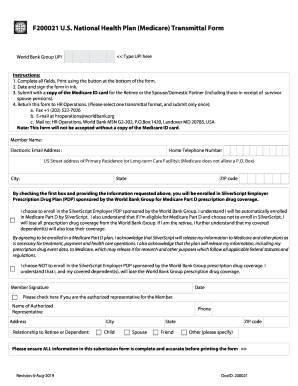
- Begin by entering the UPI in the designated field at the top of the form. This information is necessary for identification.
- Complete the fields for the member's name, electronic email address, home telephone number, and the primary residence address, ensuring to provide a valid street address as P.O. Box addresses are not accepted.
- Fill in the city, state, and ZIP code where the primary residence is located.
- Check the box to enroll in the SilverScript Employer Prescription Drug Plan, if applicable, and understand the consequences of your choice regarding Medicare Part D coverage.
- Sign and date the form in ink at the designated areas to validate your submission.
- Attach a copy of the Medicare ID card for the retiree or their spouse/domestic partner as required for the submission.
- Choose a transmittal option from faxing, emailing, or mailing the completed form to HR Operations, ensuring you only submit it once.
- Before finalizing, review all entries to ensure that all information is complete and accurate, then proceed to print the form if all is in order.
Complete the World Bank F200021 form online today to ensure your healthcare coverage is managed correctly.