Loading
Get Mgic Form 71-70321 2010-2026
How it works
-

Open form follow the instructions
-

Easily sign the form with your finger
-

Send filled & signed form or save
How to fill out the MGIC Form 71-70321 online
Filling out the MGIC Form 71-70321 online can seem challenging, but with a clear understanding of its components, the process becomes more manageable. This guide will provide you with detailed instructions to help ensure you complete the form correctly and efficiently.
Follow the steps to successfully complete the MGIC Form 71-70321 online.
- Click 'Get Form' button to obtain the form and open it in your preferred online editor.
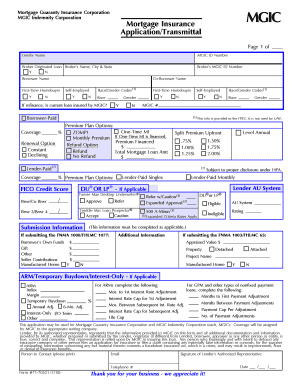
- Start with the 'Lender Name' field. Enter the name of the lending institution that is providing the mortgage. This field is crucial for identifying the lender associated with the policy.
- Fill in the 'MGIC ID Number.' This identifies your lender's specific affiliation with MGIC. Ensure you have this number handy.
- Next, complete the 'Broker Originated Loan' section. Enter the broker’s name, city, and state if applicable.
- In the 'Borrower Name' field, input the full name of the primary borrower. This is the person who will be responsible for the mortgage.
- If applicable, fill in the 'Co-Borrower Name' section with the co-borrower's full name. Be sure to use the same format as the primary borrower’s name.
- Indicate whether this is a 'First-Time Homebuyer.' Use the corresponding Yes/No options to select appropriately.
- Fill in the 'Borrower-Paid Coverage' percentage, specifying the amount of coverage you would like. Ensure this is correct as it affects your insurance rate.
- Complete the sections regarding the loan details, including the total mortgage loan amount and any chosen premium plan options.
- Review the 'Submission Information' section carefully. Provide information related to the borrower's own funds, gifts, or other contributions towards the purchase.
- If submitting necessary additional documents, indicate whether you are providing the FNMA 1008/FHLMC 1077 or FNMA 1003/FHLMC 65 forms.
- In the 'Additional Information' section, provide details about the property type and other relevant areas, such as arm or temporary buydown options.
- Verify all entered information for accuracy before proceeding to finalize your submission.
- Upon completion, save your changes. You can download, print, or share the form as needed.
Complete your MGIC Form 71-70321 online today for smooth processing.
It is popularly referred to as MAGIC, which is the acronym for “Mobile multimedia, Any-where, Global mobility solutions over, Integrated wireless and Customized services.” ing to the ITU, a 4G network requires a mobile device to be able to exchange data at 100 Mbps for high mobility communication and 1 Gbps for ...