We use cookies to improve security, personalize the user experience, enhance our marketing activities (including cooperating with our marketing partners) and for other business use.
Click "here" to read our Cookie Policy. By clicking "Accept" you agree to the use of cookies. Read less
Read more
Accept
Loading
Form preview
  • US Legal Forms
  • Form Library
  • More Forms
  • More Multi-State Forms
  • Mn Msp Airport Security Badge Application 2019

Get Mn Msp Airport Security Badge Application 2019-2025

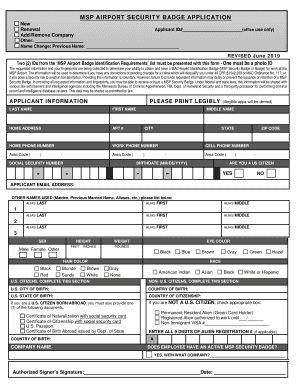
From the MSP Airport Badge Identification Requirements list must be presented with this form - One must be a photo ID The requested information and your fingerprints are being collected to determine your ability to obtain and have a MAC-Issued Identification Badge (MSP Security Badge or Badge) for work at the MSP Airport. The information will be used to determine if you have any convictions or pending charges for a crime which will disqualify you under 49 CFR 1542.209 or MAC Ordinance N.

How it works

  1. Open form

    Open form follow the instructions

  2. Easily sign form

    Easily sign the form with your finger

  3. Share form

    Send filled & signed form or save

How to fill out the MN MSP Airport Security Badge Application online

Filling out the MN MSP Airport Security Badge Application online can be a straightforward process if you follow these guidelines. This guide provides a clear, detailed walkthrough of each section of the application to assist you in successfully obtaining your security badge.

Follow the steps to complete the application process effectively.

  1. Click ‘Get Form’ button to access the MN MSP Airport Security Badge Application and open it in the editor.
  2. Begin by selecting your application type: indicate whether it is a New, Renewal, Add/Remove Company, or Other request.
  3. In the Applicant Information section, enter your Last Name, First Name, Middle Name, and any Other Names Used, ensuring to print legibly.
  4. Provide your Home Address, Home Phone Number, Work Phone Number, Cell Phone Number, and Applicant Email Address.
  5. Fill in your Social Security Number and date of birth in the required format (MM/DD/YYYY). Confirm if you are a US Citizen by checking the appropriate box.
  6. Complete the sections pertaining to U.S. and Non-U.S. citizen details as required, including U.S. City/State/Country of Birth and any relevant immigration documents.
  7. Indicate the Company Name under which you are applying and confirm if you currently hold an active MSP Security Badge, including the company name if applicable.
  8. Read and initial the Additional Applicant Agreements concerning fingerprint submission, information accuracy, and badge responsibilities.
  9. Fill out the TSA Criminal History Questionnaire and the MAC Security Ordinance Questionnaire, checking 'YES' or 'NO' as applicable.
  10. Review your entire application for completeness and accuracy, ensuring all necessary information is provided.
  11. Save your changes to the application. You may then choose to download, print, or share the completed form as needed.

Complete your MN MSP Airport Security Badge Application online today to ensure timely processing.

Get form

Experience a faster way to fill out and sign forms on the web. Access the most extensive library of templates available.
Get form

Related content

EX-10.13
19-Feb-2019 — ... Airport Police Department with regard to security badging access. All...
Learn more
Msp Airport Security Badge Application My Msp...
Minnesota's adult students recounting an event in a student's life, some take the form of...
Learn more
GRAND CHEROKEE
Authentic Accessories badge is heavy die cast alumnium, with 3M tape for easy mounting...
Learn more

Related links form

CA Metro Contractor Pre-Qualification Application - Los Angeles County 2024 IN Backflow Test Form 2013 RI Kent Hospital MR 710.18 2006 CA Rady Childrens Hospital San Diego DTF1489 2019

Questions & Answers

Get answers to your most pressing questions about US Legal Forms API.

Contact support

NON-SIDA BADGE (Blue Badge) Issued to employees needing access through security checkpoints as well as additional areas such as the loading dock and/or a door, closet or elevator in the sterile area of the airport.

Background Checks and Fingerprinting New badge applicants must be fingerprinted and pass a background and criminal history record check. Your fingerprints will be taken when you present your application at a badging office.

At the first visit, you will submit your acceptable IDs, badge application, undergo fingerprinting (as applicable), and complete training/testing. At the second visit after all security clearances are verified, you will sign for and receive your Airport ID Badge.

Badging is a simple way to recognize employees for a job well done. You can empower them to climb that corporate ladder by achieving a specific set of badges or even apply for a pay increase as their knowledge increases through earning more digital badges.

Getting a badge depends on how fast you clear the TSA threat assessment. The process may take a few days but can be longer depending on your citizenship and identification documents. Check your status in AirBadge, and once cleared, you will be notified by email to schedule your pick-up appointment in AirBadge.

An access badge is a credential used to gain entry to an area having automated access control entry points. Entry points may be doors, turnstiles, parking gates or other barriers. An example DoD Common Access Card A private security officer with an access card/ID card.

Individuals working in Secured/Sterile Areas and other restricted areas of the Airport Terminal and ramp are required to obtain an airport issued Secured Identification Display Area (SIDA) badge.

The Badging & Access System allows authorized personnel to track individuals using name and or card number. Audit tools create, maintain, and protect a trail of actions of users and administrators that trace security relevant events to an individual, ensuring accountability.

Get This Form Now!

Use professional pre-built templates to fill in and sign documents online faster. Get access to thousands of forms.
Get form
If you believe that this page should be taken down, please follow our DMCA take down processhere.

Industry-leading security and compliance

US Legal Forms protects your data by complying with industry-specific security standards.
  • In businnes since 1997
    25+ years providing professional legal documents.
  • Accredited business
    Guarantees that a business meets BBB accreditation standards in the US and Canada.
  • Secured by Braintree
    Validated Level 1 PCI DSS compliant payment gateway that accepts most major credit and debit card brands from across the globe.
Get MN MSP Airport Security Badge Application
Get form
Form Packages
Adoption
Bankruptcy
Contractors
Divorce
Home Sales
Employment
Identity Theft
Incorporation
Landlord Tenant
Living Trust
Name Change
Personal Planning
Small Business
Wills & Estates
Packages A-Z
Form Categories
Affidavits
Bankruptcy
Bill of Sale
Corporate - LLC
Divorce
Employment
Identity Theft
Internet Technology
Landlord Tenant
Living Wills
Name Change
Power of Attorney
Real Estate
Small Estates
Wills
All Forms
Forms A-Z
Form Library
Customer Service
Terms of Service
Privacy Notice
Legal Hub
Content Takedown Policy
Bug Bounty Program
About Us
Help Portal
Legal Resources
Blog
Affiliates
Contact Us
Delete My Account
Site Map
Industries
Forms in Spanish
Localized Forms
State-specific Forms
Forms Kit
Legal Guides
Real Estate Handbook
All Guides
Prepared for You
Notarize
Incorporation services
Our Customers
For Consumers
For Small Business
For Attorneys
Our Sites
US Legal Forms
USLegal
FormsPass
pdfFiller
signNow
airSlate WorkFlow
DocHub
Instapage
Social Media
Call us now toll free:
+1 833 426 79 33
As seen in:
  • USA Today logo picture
  • CBC News logo picture
  • LA Times logo picture
  • The Washington Post logo picture
  • AP logo picture
  • Forbes logo picture
© Copyright 1997-2025
airSlate Legal Forms, Inc.
3720 Flowood Dr, Flowood, Mississippi 39232
Form Packages
Adoption
Bankruptcy
Contractors
Divorce
Home Sales
Employment
Identity Theft
Incorporation
Landlord Tenant
Living Trust
Name Change
Personal Planning
Small Business
Wills & Estates
Packages A-Z
Form Categories
Affidavits
Bankruptcy
Bill of Sale
Corporate - LLC
Divorce
Employment
Identity Theft
Internet Technology
Landlord Tenant
Living Wills
Name Change
Power of Attorney
Real Estate
Small Estates
Wills
All Forms
Forms A-Z
Form Library
Customer Service
Terms of Service
Privacy Notice
Legal Hub
Content Takedown Policy
Bug Bounty Program
About Us
Help Portal
Legal Resources
Blog
Affiliates
Contact Us
Delete My Account
Site Map
Industries
Forms in Spanish
Localized Forms
State-specific Forms
Forms Kit
Legal Guides
Real Estate Handbook
All Guides
Prepared for You
Notarize
Incorporation services
Our Customers
For Consumers
For Small Business
For Attorneys
Our Sites
US Legal Forms
USLegal
FormsPass
pdfFiller
signNow
airSlate WorkFlow
DocHub
Instapage
Social Media
Call us now toll free:
+1 833 426 79 33
As seen in:
  • USA Today logo picture
  • CBC News logo picture
  • LA Times logo picture
  • The Washington Post logo picture
  • AP logo picture
  • Forbes logo picture
© Copyright 1997-2025
airSlate Legal Forms, Inc.
3720 Flowood Dr, Flowood, Mississippi 39232