Loading
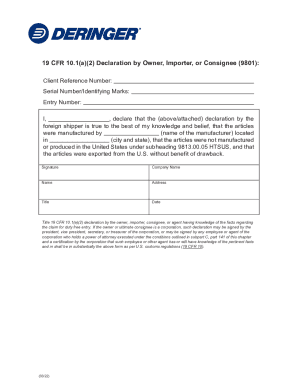
Get Deringer 19 Cfr 10.1(a)(2) Declaration By Owner Importer Or Consignee 2022-2026
How it works
-

Open form follow the instructions
-

Easily sign the form with your finger
-

Send filled & signed form or save
How to fill out the Deringer 19 CFR 10.1(a)(2) Declaration By Owner Importer Or Consignee online
The Deringer 19 CFR 10.1(a)(2) Declaration By Owner Importer Or Consignee is an essential document required for declaring items imported into the United States. This guide provides a straightforward, step-by-step approach to assist users in accurately completing this declaration online.
Follow the steps to effectively complete the declaration form.
- Press the ‘Get Form’ button to access the document and load it in the online editor.
- Begin by entering your Client Reference Number in the designated field, ensuring that this number is specific to your import case.
- Next, fill in the Serial Number or Identifying Marks of the goods you are declaring. This helps in tracking and identification.
- Enter the Entry Number, which is critical for the processing of your import declaration.
- In the declaration section, state your name after the phrase, 'I, ____, declare that the...' Be sure to input your full name clearly.
- Identify the manufacturer of the articles by entering their name in the specific field provided.
- Specify the city and state where the manufacturer is located. This information is crucial for validating the origin of the goods.
- Affirm that the articles were not manufactured in the United States under subheading 9813.00.05 HTSUS by selecting the corresponding option.
- Indicate that the articles were exported from the U.S. without the benefit of drawback in the appropriate section.
- Sign the document by placing your signature in the signature field, confirming that the information provided is accurate to the best of your knowledge.
- Include your company name, position title, and the full address of the declaring individual or organization.
- Lastly, enter the date on which the declaration is completed. Ensure it is current and reflects the submission date.
- After filling out all required fields, you can save changes, download, print, or share the completed form as needed.
Start completing your document online today to ensure a smooth import process.
To ship dangerous goods, consignors are required to prepare a form certifying that the cargo has been packed, labeled and declared ing with the IATA Dangerous Goods Regulations (DGR).