Loading
Get Greystar Real Estate Partners Rental Application 2010-2026
How it works
-

Open form follow the instructions
-

Easily sign the form with your finger
-

Send filled & signed form or save
How to fill out the Greystar Real Estate Partners Rental Application online
Completing the Greystar Real Estate Partners Rental Application online is a straightforward process. This guide will provide you with clear and systematic instructions on how to fill out each section of the application effectively.
Follow the steps to complete your rental application online.
- Click ‘Get Form’ button to obtain the form and open it in the editing interface.
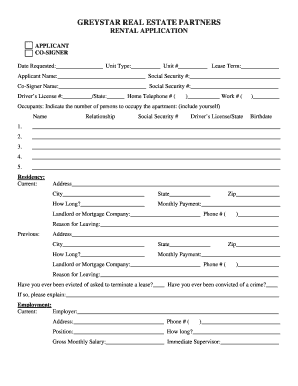
- Begin by filling in the date requested, unit type, unit number, and lease term at the top of the application. This information is essential for identifying your rental preferences.
- In the 'Applicant' section, enter your full name and Social Security number. If you have a co-signer, provide their name and Social Security number as well.
- Fill in your driver's license number and state, along with your home and work telephone numbers. Ensure that all information is accurate for effective communication.
- Indicate the number of occupants who will be moving into the apartment, and provide details for each person, including their name, relationship to you, Social Security number, driver's license/state, and birthdate.
- Complete the current residency section with your address, city, state, length of residency, monthly payment, landlord or mortgage company name, phone number, and reason for leaving.
- Repeat the previous step for your previous residency, if applicable.
- Answer the questions regarding eviction history and criminal convictions. Provide additional explanations if applicable.
- In the employment section, list your current employer's name, address, phone number, your position, duration of employment, gross monthly salary, and your immediate supervisor's name.
- If applicable, fill out the same employment details for your spouse or partner, and include previous employment information as well.
- In the financial section, provide the name and address of your bank.
- Indicate the number and types of vehicles you own, including details such as make, model, year, and license plate number.
- Complete the pet information section if you have pets, providing details regarding each pet.
- List emergency contact information, including the name, relationship, address, and phone numbers of the person(s) to notify in case of an emergency.
- Review all entries to ensure accuracy. Once satisfied, apply your signature(s) and date the application where indicated. Submit the completed application as instructed.
Complete your application online today to secure your new home!
No up-front application, admin fees/deposits or security deposits (restrictions apply) 40% discount when you live and work at the same Greystar owned/managed community. 20% discount when you live and work at different Greystar owned/managed communities.