Loading
Get Canada At1 2015
How it works
-

Open form follow the instructions
-

Easily sign the form with your finger
-

Send filled & signed form or save
How to fill out the Canada AT1 online
Filling out the Canada AT1 form can be a straightforward process when you understand each component. This guide provides step-by-step instructions to help users complete the form accurately and efficiently.
Follow the steps to complete the Canada AT1 form online.
- Click ‘Get Form’ button to obtain the form and open it in the editor.
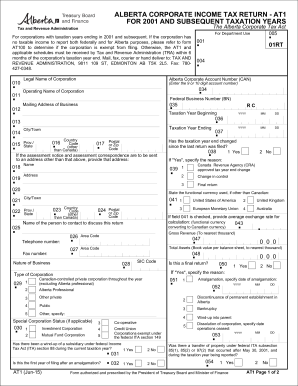
- Enter the legal name of the corporation in the designated field. Ensure accurate spelling and proper capitalization to match official records.
- Input the Alberta corporate account number, which is a unique identifier for the corporation. This number is usually 9 or 10 digits.
- Fill in the operating name of the corporation if it differs from the legal name, and provide the federal business number if applicable.
- Complete the mailing address section. This should be where all communications regarding the AT1 will be sent. Include the city, province/state, postal/zip code, and country code if it is outside Canada.
- Indicate the beginning and ending dates of the taxation year. Use the date format specified (YYYY-MM-DD) to avoid errors.
- If there is a change of address or if the assessment notice should be sent to another address, fill out the corresponding section.
- Answer questions regarding changes in taxation year end, changes in control, or if this is a final return. Provide explanations if applicable.
- Report financial figures such as total assets and gross revenue in dollars, ensuring not to include cents or non-numeric characters.
- Complete the section regarding taxable income, ensuring to reconcile any differences between federal and Alberta taxable income. You may need to attach supporting schedules.
- Review the Alberta tax payable calculations by following the steps provided for deductions and credits. Ensure all relevant schedules are attached.
- Fill out the certification area, printing your name and position. Ensure that an authorized signing officer signs the document before submission.
- Once all sections are complete, you can save changes, download the form, print it, or share it as needed.
Start completing your Canada AT1 form online today for a smooth filing experience.
Get form
Experience a faster way to fill out and sign forms on the web. Access the most extensive library of templates available.
Get This Form Now!
Use professional pre-built templates to fill in and sign documents online faster. Get access to thousands of forms.