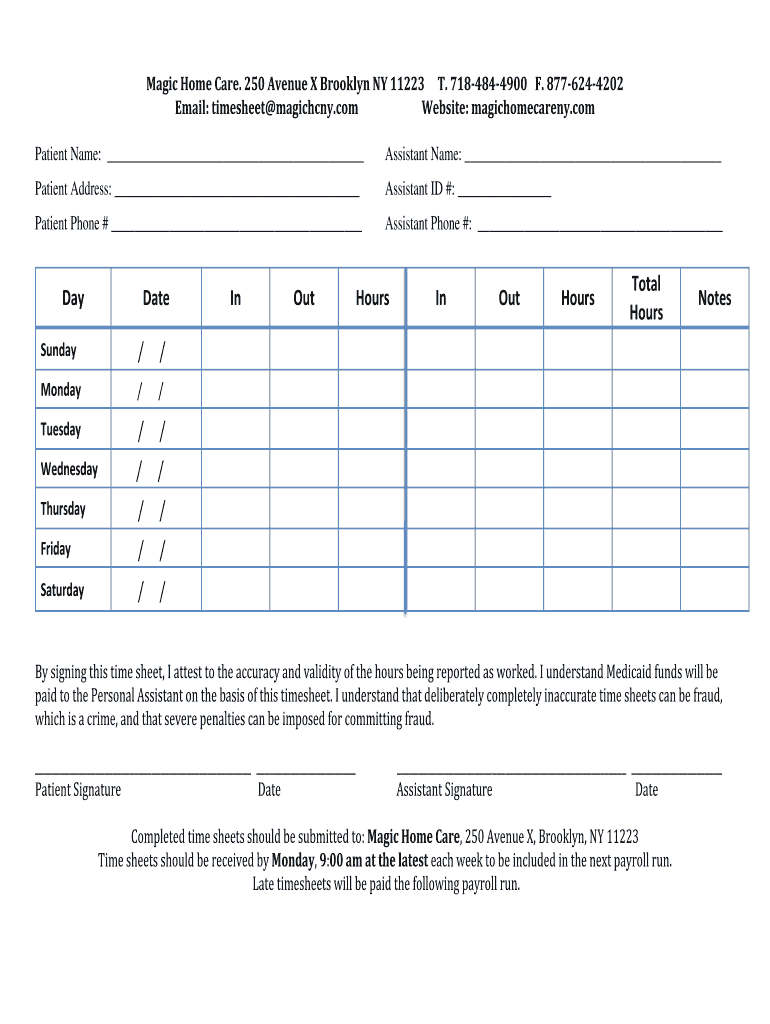
Assistant Name: Patient Address: Assistant ID #: Patient Phone # Assistant Phone #: Day Sunday Monday Tuesday Wednesday Thursday Friday Saturday Date / / / / / / / / Out Hours In Out Hours Total Hours Notes / / / In / / / By signing this time sheet, I attest to the accuracy and.

Open form follow the instructions

Easily sign the form with your finger

Send filled & signed form or save
How to fill out the NY Magic Home Care Timesheet online
This guide provides step-by-step instructions on how to accurately complete the NY Magic Home Care Timesheet online. By following these instructions, users can ensure that their hours and information are recorded correctly for timely payroll processing.
Follow the steps to complete the timesheet accurately.
- Click ‘Get Form’ button to access the timesheet and open it in the editing interface.
- Begin by filling in the patient name in the designated field provided. Ensure that the name matches the records of the individual receiving care.
- Add the patient’s address in the address field; this information is essential for record-keeping and communication.
- Enter the assistant ID number. This is a unique identifier that helps in associating the timesheet with the right personal assistant.
- Complete the phone number fields for both the patient and the assistant. Accurate contact information is crucial for any follow-up communications.
- For each day of the week listed, input the date and record specific times for 'In' and 'Out' along with the 'Hours' worked for each shift. This section is important for payment accuracy.
- Calculate the total hours worked for the week and fill this in the 'Total Hours' section. Double-check your calculations to ensure they are correct.
- If there are any relevant notes that need to accompany the timesheet, please include them in the 'Notes' section.
- Both the patient and the assistant must sign and date the timesheet to confirm the accuracy of the reported hours. Ensure all signatures are in place before submission.
- After completing the form, save your changes. You have the option to download, print, or share the timesheet as needed.
Complete your NY Magic Home Care Timesheet online today to ensure timely payments.
Experience a faster way to fill out and sign forms on the web. Access the most extensive library of templates available.
Related content
the care provider's timesheet twice a month, but in most cases, the paycheck ... home care...
by JM Zoeckler · 2017 · Cited by 2 — Qualitative analysis feature the analysis of both...
Labor costs were covered by CETA contracts and the home care corporation was approached to...
Use professional pre-built templates to fill in and sign documents online faster. Get access to thousands of forms.
If you believe that this page should be taken down, please follow our DMCA take down process here.