Loading
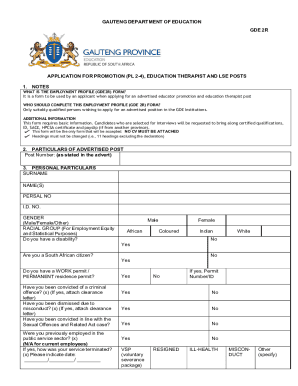
Get Za Gde 2r - Gauteng Province 2023-2026
How it works
-

Open form follow the instructions
-

Easily sign the form with your finger
-

Send filled & signed form or save
How to fill out the ZA GDE 2R - Gauteng Province online
This guide provides a clear and comprehensive overview of how to complete the ZA GDE 2R form for applications to advertised educator promotions and education therapist posts. Following these steps will help ensure that you submit a complete and accurate application.
Follow the steps to successfully complete the ZA GDE 2R form online.
- Click ‘Get Form’ button to access the ZA GDE 2R form and open it in your browser or editor.
- Fill in the particulars of the advertised post by entering the post number as stated in the advertisement.
- Complete your personal particulars. Enter your surname, first names, PERSAL number, ID number, and gender. Select your racial group for employment equity and statistical purposes. Indicate if you have a disability and confirm your South African citizenship status.
- Answer questions regarding criminal convictions and previous employment in the public service. Attach clearance letters where applicable.
- Provide your contact details including your primary and alternative contact numbers, postal address, and email address.
- List the languages you can speak, write, read, and teach.
- Document your qualifications. Specify the school, university, or college attended, qualification obtained, subjects or majors, and post level.
- Detail any additional certificates from other courses attended. Specify the name of the course, duration, and service provider or institution.
- Outline your skills relevant to management or leadership in the education sector.
- Provide information about your current and previous employment in education, including institution names, learning areas, job titles, and the exact dates of your tenure.
- List any extra and co-curricular activities along with the type of activity, organization, and duration.
- Provide names and contact details of three references along with their relationship to you.
- Read and sign the declaration to affirm that all information provided is accurate. Remember that only your original signature will be considered valid.
- After completing the form, save your changes, and download or print your application for submission.
Submit your completed ZA GDE 2R form online today to ensure your application is processed.
MEC for Education: Matome Chiloane, Mr Street Address: Gauteng Department of Education, 6 Hollard Building, Talis House, JOHANNESBURG.