Loading
Form preview
  • US Legal Forms
  • Other Templates
  • More Forms
  • More Multi-State Forms
  • Uk Cashplus Standing Order Mandate 2015

Get Uk Cashplus Standing Order Mandate 2015-2026

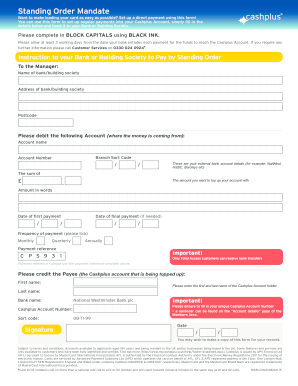
Fill in the details below and hand it to your Bank or Building Society. Please complete in BLOCK CAPITALS using BLACK INK. Please allow at least 3 working days from the date your bank initiates each payment for the funds to reach the Cashplus Account. If you require any further information please call Customer Services on 0330 024 0924 . Instruction to your Bank or Building Society to Pay by Standing Order To the Manager: Name of bank/building society.

How it works

  1. Open form

    Open form follow the instructions

  2. Easily sign form

    Easily sign the form with your finger

  3. Share form

    Send filled & signed form or save

How to fill out the UK Cashplus Standing Order Mandate online

Setting up a standing order for your Cashplus account is a straightforward process that can help you manage your finances with ease. This guide will walk you through each section of the UK Cashplus Standing Order Mandate, ensuring you understand how to fill it out correctly and efficiently.

Follow the steps to complete the standing order mandate

  1. Click the ‘Get Form’ button to obtain the form and open it in the editor.
  2. Begin by filling in the name of your bank or building society. This information is crucial as it directs where the funds will be debited from.
  3. Next, provide the bank or building society's address. Complete this section accurately to ensure smooth processing.
  4. Input the account name from which funds will be drawn. This identifies your account within the bank.
  5. Fill in the branch sort code and account number accurately. These numbers are key for identifying the correct account for the transaction.
  6. Specify the amount you wish to transfer, both in figures and in words to eliminate any confusion or errors in processing.
  7. Choose the date for the first payment and, if necessary, the date for the final payment. Ensure these dates align with your financial planning.
  8. Select the frequency of the payments by ticking the appropriate box — monthly, quarterly, or annually.
  9. Enter the payment reference number provided to you; use this consistently for smooth identification of your payments.
  10. Fill in the recipient details of the Cashplus account, including the first name, last name, account number, and sort code. Ensure this information matches your Cashplus account.
  11. Sign and date the form to authorize the standing order. This step is critical as it verifies that you agree to the terms.
  12. Finally, review all the details for accuracy before handing the completed form to your bank for processing. You may also wish to save a copy for your records.

Complete your documents online today to get started with your Cashplus Standing Order.

Get form

Experience a faster way to fill out and sign forms on the web. Access the most extensive library of templates available.
Get form

Related content

Form S-1
03-Mar-2023 — Approximate date of commencement of proposed sale to the public: As soon...
Learn more
Linking Cash Transfers to Services and Sectors
by K Roelen · 2017 · Cited by 93 — 'CASH PLUS' PROGRAMMING: STRENGTHENING IMPACTS ON...
Learn more
LEVI STRAUSS & CO.
08-Apr-2021 — We have historically relied primarily on cash flows from operations...
Learn more

Related links form

Companion Life 10304 2019 MI Form 5080 2025 Budget Narrative Sample Template 2010 NV Grand Sierra Resort Casino Level Floor Plan 2023

Questions & Answers

Get answers to your most pressing questions about US Legal Forms API.

Contact support

But they have some important differences. A standing order is an automated payment method set up between a customer and a bank, to send payments to other people or organizations. A Direct Debit follows the same method, but it is authorized by a customer and managed by an organization.

A standing order is a regular payment of the same amount that's paid on a specified date. It allows the bank to take money regularly from your account to pay another account. You can use a standing order for many payment types, including: Transferring money between your accounts.

A standing order is a regular payment that you can set up to pay other people, organisations or transfer to your other bank accounts. You can amend or cancel the standing order as and when you like. A Direct Debit can only be set up by the organisation to which you're making the payment.

We've teamed up with the Post Office so that you can deposit cash into your account over the counter at any of their 11,500+ branches across the UK. All you'll need to be able to deposit cash into your account is the money and your card. The money will then be available in your account immediately.

Is Netflix a direct debit or standing order? Neither, it's a recurring card payment. It's similar to a direct debit but Netflix will use your debit card information rather than your current account details (your account number and sort code).

Standing orders can be good for really small businesses You'll have to continually check that payments are successful however. With a Direct Debit you'd be notified of any late or failed payments.

'Bank name': APS Financial Ltd, the company that issued and operates the card on our behalf. 'Bank address': PO Box 71064, London, SE1P 4ZE.

Disadvantages of standing orders Forgetting to set a standing order can lead to missing a payment and then receiving a demand for payment from the creditor, where you may have to pay interest on top of the amount owed. Many companies also refuse payment by standing order because they have no control over it.

Get This Form Now!

Use professional pre-built templates to fill in and sign documents online faster. Get access to thousands of forms.
Get form
If you believe that this page should be taken down, please follow our DMCA take down processhere.
Get UK Cashplus Standing Order Mandate
Get form
  • Adoption
  • Bankruptcy
  • Contractors
  • Divorce
  • Home Sales
  • Employment
  • Identity Theft
  • Incorporation
  • Landlord Tenant
  • Living Trust
  • Name Change
  • Personal Planning
  • Small Business
  • Wills & Estates
  • Packages A-Z
  • Affidavits
  • Bankruptcy
  • Bill of Sale
  • Corporate - LLC
  • Divorce
  • Employment
  • Identity Theft
  • Internet Technology
  • Landlord Tenant
  • Living Wills
  • Name Change
  • Power of Attorney
  • Real Estate
  • Small Estates
  • Wills
  • All Forms
  • Forms A-Z
  • Other Templates
  • Legal Hub
  • About Us
  • Help Portal
  • Legal Resources
  • Blog
  • Affiliates
  • Contact Us
  • Delete My Account
  • Site Map
  • Industries
  • Forms in Spanish
  • Localized Forms
  • State-specific Forms
  • Forms Kit
  • Real Estate Handbook
  • All Guides
  • Notarize
  • Incorporation services
  • For Consumers
  • For Small Business
  • For Attorneys
  • USLegal
  • FormsPass
  • pdfFiller
  • signNow
  • altaFlow
  • DocHub
  • Instapage
Form Packages
  • Adoption
  • Bankruptcy
  • Contractors
  • Divorce
  • Home Sales
  • Employment
  • Identity Theft
  • Incorporation
  • Landlord Tenant
  • Living Trust
  • Name Change
  • Personal Planning
  • Small Business
  • Wills & Estates
  • Packages A-Z
Form Categories
  • Affidavits
  • Bankruptcy
  • Bill of Sale
  • Corporate - LLC
  • Divorce
  • Employment
  • Identity Theft
  • Internet Technology
  • Landlord Tenant
  • Living Wills
  • Name Change
  • Power of Attorney
  • Real Estate
  • Small Estates
  • Wills
  • All Forms
  • Forms A-Z
  • Other Templates
Customer Service
  • Legal Hub
  • About Us
  • Help Portal
  • Legal Resources
  • Blog
  • Affiliates
  • Contact Us
  • Delete My Account
  • Site Map
  • Industries
  • Forms in Spanish
  • Localized Forms
  • State-specific Forms
  • Forms Kit
Legal Guides
  • Real Estate Handbook
  • All Guides
Prepared for you
  • Notarize
  • Incorporation services
Our Customers
  • For Consumers
  • For Small Business
  • For Attorneys
Our Sites
  • USLegal
  • FormsPass
  • pdfFiller
  • signNow
  • altaFlow
  • DocHub
  • Instapage
Social Media
Call us now toll free:
+1 833 426 79 33
As seen in:
© Copyright 1999-2026 airSlate Legal Forms, Inc. 17 Station Street, Ste. 203, Brookline, MA 02445
  • Your Privacy Choices
  • Terms of Service
  • Privacy Notice
  • Content Takedown Policy
  • Bug Bounty Program