Loading
Get Tx Gopeo W2 Reprint Request 2011-2026
How it works
-

Open form follow the instructions
-

Easily sign the form with your finger
-

Send filled & signed form or save
How to fill out the TX GoPEO W2 Reprint Request online
Filling out the TX GoPEO W2 Reprint Request is a straightforward process that allows users to request a duplicate copy of their W-2 form. This guide provides step-by-step instructions to help users complete the request accurately and efficiently.
Follow the steps to complete your W2 Reprint Request.
- Click ‘Get Form’ button to download the W2 Reprint Request form and open it for editing.
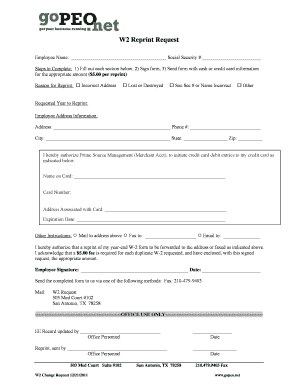
- Begin by entering your employee name in the designated field at the top of the form. Ensure that the name matches what is on your original W-2.
- Input your Social Security number in the corresponding section. Double-check the number to avoid any errors.
- Select the reason for your reprint by marking the appropriate box, such as 'Incorrect Address', 'Lost or Destroyed', or 'Soc Sec # or Name Incorrect'.
- Specify the requested year for which you need the reprint in the provided field.
- Complete your employee address information, including your current address, phone number, city, state, and zip code.
- Fill out the credit card information section to authorize the $5.00 fee for the reprint. Include the name on the card, card number, the address associated with the card, and the expiration date.
- Indicate how you would like to receive your reprint by selecting one of the options: 'Mail to address above', 'Fax to:', or 'Email to:'. Provide the necessary information if applicable.
- Sign and date the form at the bottom to verify your request.
- Send the completed form via fax to 210-479-9403 or mail it to W2 Request, 503 Med Court #102, San Antonio, TX 78258. Ensure that your payment is included.
Start your request for a duplicate W-2 form online today!
In the event you lose your Form W–2, or require a duplicate copy you can download a copy from Cal Employee Connect under the "W-2" tab. You also can request one from the State Controller's Office. Request a Duplicate Form W-2, Wage and Tax Statement ca.gov https://.sco.ca.gov › ppsd_empinfo_dpw-2 ca.gov https://.sco.ca.gov › ppsd_empinfo_dpw-2