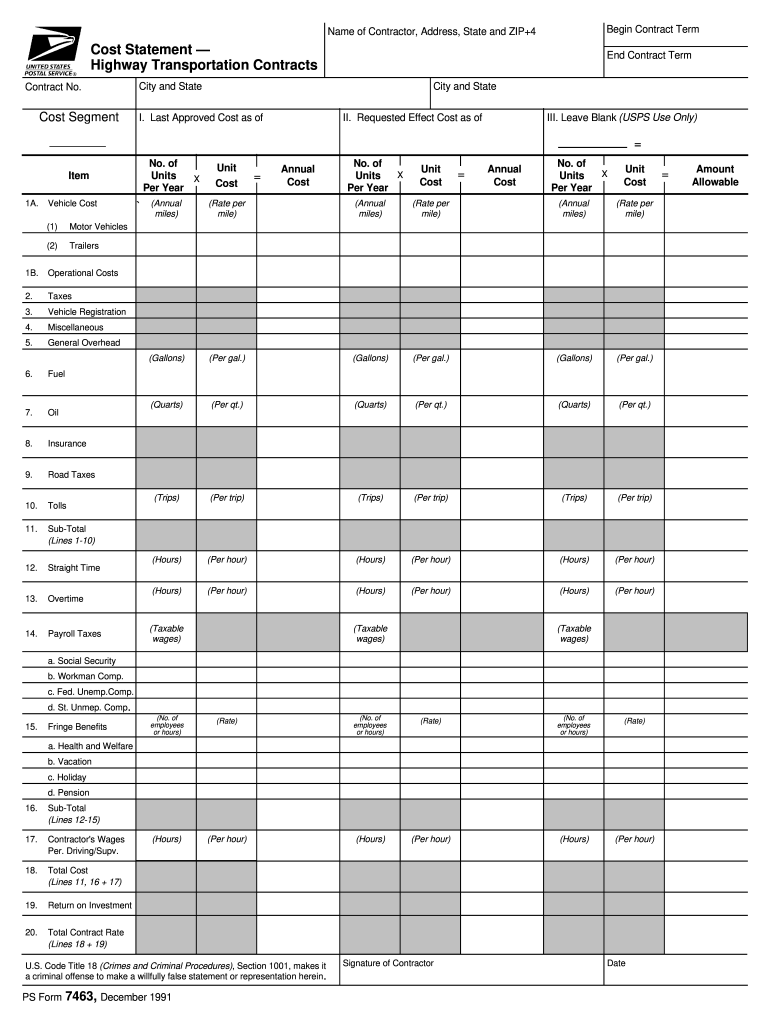
Begin Contract Term Name of Contractor, Address, State and ZIP+4 Cost Statement Highway Transportation Contracts Contract No. Cost Segment End Contract Term City and State City and State I. Last Approved.

Open form follow the instructions

Easily sign the form with your finger

Send filled & signed form or save
How to fill out the USPS PS 7463 online
The USPS PS 7463 form is essential for contractors detailing costs associated with highway transportation contracts. This guide will assist you in completing the form accurately and efficiently online.
Follow the steps to fill out the USPS PS 7463 online.
- Click ‘Get Form’ button to access the form and open it in your preferred online editor.
- Enter the name of the contractor in the designated field, followed by the complete address, including the state and ZIP+4 code.
- Provide the contract number as well as the details regarding cost segments for tracking expenses.
- Fill in the 'Last Approved Cost as of' date to indicate the most recent assessment related to the contract.
- In 'Requested Effect Cost as of', input the new cost that you are proposing.
- For each cost item listed in the form, start with the vehicle costs. Specify the number of units per year and their costs—calculate the annual cost accordingly for motor vehicles and trailers.
- Continue by filling out the operational costs section. List expenses such as taxes, vehicle registration, and miscellaneous costs with appropriate calculations.
- Complete the payroll-related fields, including straight time, overtime, and taxes. Ensure you detail all fringe benefits for your employees.
- Review all total costs accumulated in the form, particularly lines 11, 16, and 17 for the 'Total Cost' calculations.
- Finally, confirm the total contract rate and provide the contractor's signature along with the date to validate the document.
- After reviewing your information for accuracy, save changes, and choose to download, print, or share the completed form as needed.
Complete your USPS PS 7463 form online today for a smooth and efficient filing process.
Experience a faster way to fill out and sign forms on the web. Access the most extensive library of templates available.
Related content
This catalog lists all national Postal Service directives and forms, as well as government...
... usps pickup near me, Harold and kumar order at white castle, Https accounts ... form...
Nov 30, 1983 — WASHINGTON APPLE PI DISK LIBRARY MAIL ORDER FORM. Washington want mailed...
Get answers to your most pressing questions about US Legal Forms API.
How do I bid on USPS contract routes?
Post Office Registration To sell most other services or goods to USPS, you need to register with the agency online. Once you complete the registration information, USPS reviews your submission. If it's complete, they'll send you your login credentials. That will let you submit bids.
How to bid on USPS contracts?
If you want to bid on contracts with the USPS as an organization, you'll also need to register with SAM (System for Award Management), formerly CCR (Central Contractor Registration). You can register with SAM or check on the status of your registration on the SAM.gov website: https://sam.gov/SAM/pages/public/index.jsf.
What is a HCR in trucking?
HCRs are routes serviced by suppliers carrying mail over highways between designated points. These suppliers provide contracted transportation services under specified schedules outlined in the contract terms and conditions.
What does HCR stand for at USPS?
Highway contract routes (HCRs) are traveled by postal contractors who carry mail in bulk. HCRs make up the largest single group of transportation services used by USPS and range from long-haul tractor trailers to box delivery routes.
What is an HCR driver?
The Postal Service uses Highway Contract Route (HCR) suppliers to transport mail and equipment between plants, post offices, and other designated points.
What is the 5 digit HCR number?
The Highway Contract Route (HCR) number is the five-digit number assigned to each HCR and is usually found in the first column of numbers on the PS Form 5398's. The first three digits of the HCR number are known as the prefix and represents the headout point of that HCR contract.
Use professional pre-built templates to fill in and sign documents online faster. Get access to thousands of forms.
If you believe that this page should be taken down, please follow our DMCA take down process here.