Loading
Get Uk Prudential Genm5243 2023-2026
How it works
-

Open form follow the instructions
-

Easily sign the form with your finger
-

Send filled & signed form or save
How to fill out the UK Prudential GENM5243 online
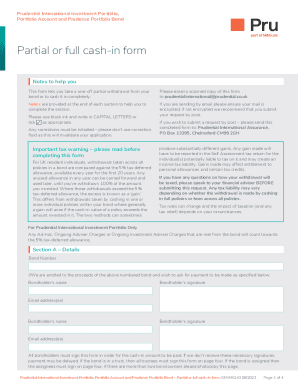
This guide provides a clear and supportive overview of how to effectively complete the UK Prudential GENM5243 form online. Following the steps outlined will help ensure that your partial or full cash-in request is processed smoothly.
Follow the steps to successfully complete the form.
- Press the ‘Get Form’ button to access the UK Prudential GENM5243 form and open it in your editor.
- In Section A, provide the bond number and enter bondholders' names and email addresses. Ensure all bondholders sign the form to avoid payment delays.
- Move to Section B for partial withdrawals. Choose one option: either fully cash-in a specified number of policies, withdraw a specific amount by fully cashing in policies, or withdraw a specified amount from all policies. Complete the funds table as required for your selected option.
- If you want to cash in the entire bond, tick the appropriate box in Section C to indicate a full surrender.
- In Section D, enter the payee details, including the name of the bank or building society, account name, account number, sort code, and necessary identifiers for telegraphic transfer.
- Section E is intended for bonds under trust. Trustees must provide their names, signatures, and dates as confirmation for the payment request.
- In Section F, if the bond has been assigned, an authorized person must sign, indicate their designation, and provide their full name and address.
- Review all sections for accuracy and completeness. Ensure all necessary documentation is included, such as identification and address verification.
- Finally, save changes to the form, and proceed to submit it via email or post as highlighted in the notes.
Complete your UK Prudential GENM5243 form online today to manage your investments efficiently.
Please call us on 0800 000 000 (Mon-Fri, 8am-6pm) or select your product from the list at the bottom of the page. If you reside outside the UK please call +44 1786 448844 between 8am-6pm (GMT) Monday-Friday. You may be able to manage your product enquiry online through our Online Service.