Loading
Get Nz Gsfa Change In Personal Details 2018-2026
How it works
-

Open form follow the instructions
-

Easily sign the form with your finger
-

Send filled & signed form or save
How to fill out the NZ GSFA Change In Personal Details online
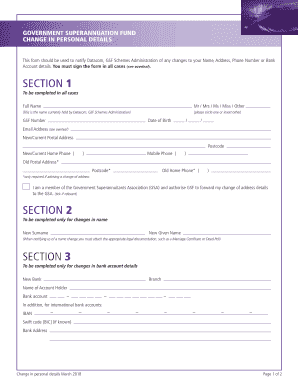
The NZ GSFA Change In Personal Details form allows users to notify Datacom, GSF Schemes Administration of any changes to their personal information, including name, address, phone number, or bank account details. This guide provides clear, step-by-step instructions to help users complete the form online.
Follow the steps to fill out the form accurately and efficiently.
- Click the ‘Get Form’ button to access the NZ GSFA Change In Personal Details form and open it in your preferred editor.
- In Section 1, fill in your full name as it currently appears in Datacom's records. Select your title (Mr, Mrs, Ms, Miss, or other). Next, provide your GSF number, date of birth, email address, and your new/current postal address along with the postcode. Include your new/current home phone and mobile phone numbers.
- If you are reporting a change of address, also fill in your old postal address and postcode, as well as your old home phone number.
- If applicable, indicate whether you are a member of the Government Superannuitants Association (GSA) by ticking the relevant box.
- If you are changing your name, proceed to Section 2 where you need to provide your new surname and new given name. Remember to attach any required legal documentation like a Marriage Certificate or Deed Poll.
- For changes to bank account details, go to Section 3. Enter the name of the new bank, the branch, the name of the account holder, and the new bank account number. If applicable, include the IBAN and Swift code, and the bank address. Ensure that all banking details are accurate.
- In Section 4, if you have not previously provided alternative contact details or if they are changing, fill in the full name of your alternative contact, their relationship to you, email address, postal address, postcode, and their contact phone number.
- Finally, sign Section 5 to confirm the accuracy of the information provided. Include the date of signing. Ensure the completed form, along with any supporting documents, is forwarded to Datacom, GSF Schemes Administration.
Complete your NZ GSFA Change In Personal Details online to ensure your information is up to date.