Loading
Get Az Dependable Dental Staffing Timesheet 2018-2026
How it works
-

Open form follow the instructions
-

Easily sign the form with your finger
-

Send filled & signed form or save
How to fill out the AZ Dependable Dental Staffing TimeSheet online
Filling out the AZ Dependable Dental Staffing TimeSheet online is an essential process for ensuring accurate record-keeping of work hours. This guide will walk you through each section of the form clearly and effectively, helping you complete it with confidence.
Follow the steps to accurately complete your timesheet.
- Click ‘Get Form’ button to obtain the form and open it in the online document management tool.
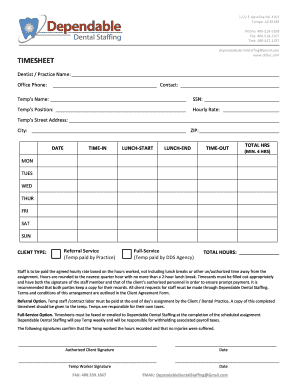
- Begin filling in the 'Dentist / Practice Name' field to indicate the name of the dental practice you are working for. Alongside it, provide the office phone number and a contact person's name to ensure proper communication.
- In the 'Temp’s Name' section, enter your full name. Next, fill in your Social Security Number (SSN) and specify your position to provide necessary identification.
- Indicate your hourly rate in the corresponding field. This information is critical for calculating payment based on the hours submitted.
- Complete the 'Temp’s Street Address', 'City', and 'ZIP' code sections with your current address, ensuring there are no errors for payment processing.
- For each day of the week (Monday to Sunday), fill in the date and document your time in and out, as well as the start and end times for lunch breaks. Make sure that the total hours reflect a minimum of four hours worked while accounting for your breaks.
- Select the 'Client Type' that applies to your work arrangement. This will clarify whether you are a temp paid by the practice or through the Dependable Dental Staffing agency.
- Sum up the total hours worked for the week and enter this in the designated 'TOTAL HOURS' field to ensure accurate payment calculation.
- Both the temp and authorized client personnel must sign the timesheet to validate the hours worked. Ensure both signatures are obtained and recorded along with the respective dates.
- Once completed, save your changes in the online document management tool. You can then download, print, or share the timesheet as necessary for record-keeping.
Complete your documentation online to ensure efficient processing and payment.