Loading
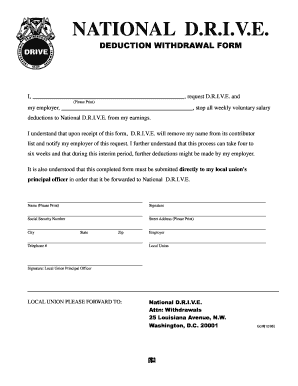
Get Tx National Drive Deduction Withdrawal Form 1996-2026
How it works
-

Open form follow the instructions
-

Easily sign the form with your finger
-

Send filled & signed form or save
How to fill out the TX National Drive Deduction Withdrawal Form online
Filling out the TX National Drive Deduction Withdrawal Form is essential for users wishing to stop voluntary salary deductions for the National D.R.I.V.E. program. This guide will provide clear instructions to help you complete the form accurately and efficiently online.
Follow the steps to complete the TX National Drive Deduction Withdrawal Form online.
- Click ‘Get Form’ button to obtain the form and open it in the editor.
- In the first field, clearly print your full name as it appears on your official documents.
- In the second field, specify the name of your employer responsible for your salary deductions.
- Acknowledge your understanding of the withdrawal process by reading the provided information and confirming you are aware it might take four to six weeks for the changes to reflect.
- Enter your Social Security Number in the next field, ensuring this information is accurate and private.
- Provide your complete street address, as it is necessary for record-keeping and communication.
- Indicate your city, state, and zip code for additional identification.
- List the name of your employer once more for clarity.
- Include your telephone number so that the local union can contact you if needed.
- Specify your local union in the designated field to ensure your request is properly routed.
- Finally, ensure your local union principal officer signs the form to validate your request.
- Review all details for accuracy, then save the changes, and download the completed form. You may print or share it as necessary.
Complete your TX National Drive Deduction Withdrawal Form online today for a smooth transition.
The most common way to withdraw money from your RRSP is to transfer the funds to an RRIF. From there, you must withdraw at least a pre-determined (minimum) amount each year. You can also purchase an annuity where you'll receive monthly income for as long as you live.