Loading
Get Ca Cvusd Megans Law Volunteer Screening Request 2018-2026
How it works
-

Open form follow the instructions
-

Easily sign the form with your finger
-

Send filled & signed form or save
How to fill out the CA CVUSD Megans Law Volunteer Screening Request online
This guide provides clear, step-by-step instructions for completing the CA CVUSD Megans Law Volunteer Screening Request online. This process ensures that volunteers meet the necessary requirements to support a safe environment for students.
Follow the steps to complete your volunteer screening request efficiently.
- Click ‘Get Form’ button to obtain the form and open it in the editor.
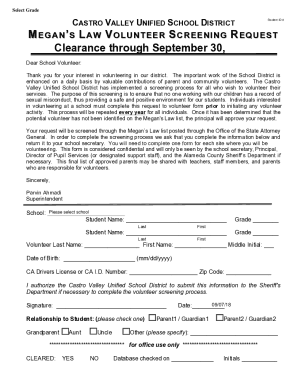
- Begin by selecting the school where you intend to volunteer from the provided dropdown menu.
- Enter the first and last name of the student you will be volunteering with in the designated spaces. Make sure to fill out the grade for each student accurately.
- Complete your information by entering your last name, first name, and middle initial in the appropriate fields.
- Provide your date of birth in the specified format (mm/dd/yyyy) to verify your identity.
- Input your California Driver's License or California ID number and your zip code in the designated fields.
- Authorize the Castro Valley Unified School District by signing in the designated area. This allows the district to submit your information to the Sheriff's Department if needed.
- Indicate your relationship to the student by checking the corresponding option (e.g., grandparent, parent, etc.). If your relationship is not listed, specify it in the provided space.
- Finally, review all the information you have entered for accuracy before submitting the form. You can save changes, download, print, or share the form as required after submission.
Complete your CA CVUSD Megans Law Volunteer Screening Request online today to contribute to a safe school environment.